A client emails asking why last month's lead number doesn't match the one you sent in April. You go looking, and two days later you have a real answer: a workflow somebody rebuilt, a form that stopped passing UTMs, a sub-account on the wrong timezone. The cause is nearly always mundane. The two days are what cost you: by the time you reply, the client has decided your numbers are approximate.
The useful part is that the causes repeat. Almost every reporting failure I find in a GoHighLevel account sits in one of eight places, and all eight can be checked from the interface without a developer. Seventeen checks, grouped by area. Each one says what to open, what a healthy answer looks like, what the broken version looks like, and what it does to a client report if you leave it.
I've written elsewhere about why GoHighLevel, GA4, and your ad platforms disagree and where native reporting stops being enough. This one is the inspection rather than the diagnosis.
Set aside two hours per sub-account. Write your answers somewhere shared, because half the value is that the next person can see what you found.
Area 1: Is attribution actually landing on real contacts?
Attribution problems don't announce themselves. The fields exist, the reports populate, nothing errors. You have to open individual records.
Check 1. Click IDs on contacts created this week.
Look at: Filter contacts to the last seven days, open ten of them, and read the custom fields where gclid and fbclid should be.
Good: Paid contacts carry a click ID, organic ones don't, and you can tell them apart.
Failure: The fields don't exist, or they exist and are empty on contacts you know came from paid.
On the report: Click IDs are the only values that reconcile against Google and Meta at the record level. Without them, a paid-versus-CRM comparison is two totals you can't tie together.
Check 2. UTM completeness by form.
Look at: Group last month's contacts by the form that created them, then check what share of each group has a populated utm_source.
Good: Roughly comparable capture rates across forms.
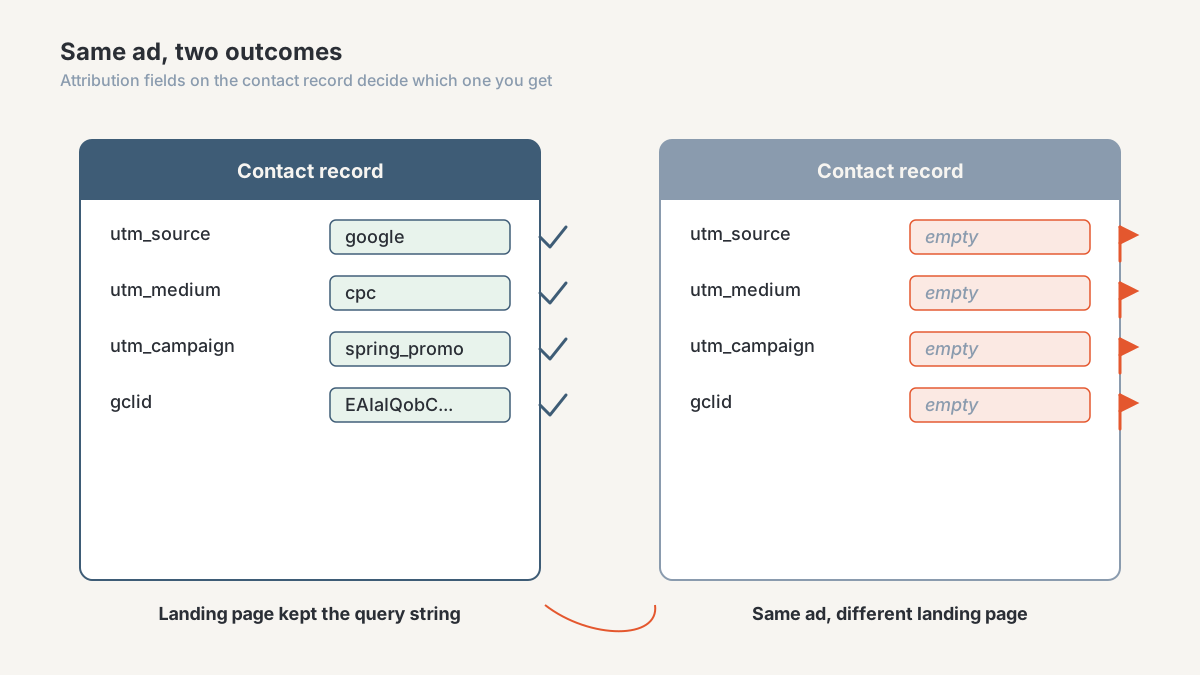
Failure: One form sits near zero while the others look fine. That's an iframe embed, a redirect stripping the query string, or a hop with a clean URL.
On the report: A single leaking form reassigns its whole volume to Direct. Your best channel then looks worse than one doing nothing, and someone moves budget on the strength of it.
Check 3. The live click test.
Look at: Click your own live ad on a phone, complete the form, then find the contact it created. Once per client, per platform.
Good: The contact arrives with the source, medium, campaign, and click ID intact.
Failure: Anything missing. Note which hop lost it.
On the report: Diagrams of a tracking setup are always cleaner than the setup. The only evidence attribution works is a record that survived the journey.
Area 2: What is your duplicate policy, per location?
Duplicate handling is a business decision, usually made by accident in the first sub-account anyone built, then inherited by every one after.
Check 4. The setting itself, in each sub-account.
Look at: Open duplicate-contact handling in each location's settings and record what it says. Not what you think it says.
Good: The same deliberate policy across sub-accounts, written down, matching how you count leads.
Failure: Different settings in different locations, or nobody knows who set them.
On the report: Allowing duplicates inflates the lead count; blocking them deflates it against the ad platform. Either is defensible. Two clients on opposite settings reported under one metric name is not.
Check 5. Duplicate evidence in the data.
Look at: Export contacts, sort by phone and then by email, and count repeats. Check whether any form collects only one of the two.
Good: The repeat rate matches what the policy predicts.
Failure: Near-duplicates the settings said shouldn't exist, usually a form capturing email only while matching runs on phone.
On the report: Merges keep one record's attribution and discard the other's. Channel performance shifts, and nothing in the interface explains why.
Area 3: Do your pipelines and stages mean the same thing everywhere?
Check 6. The stage inventory.
Look at: List every pipeline and stage across all sub-accounts in one document. This is usually where the room goes quiet.
Good: Few pipelines, with stage names two different account managers define the same way.
Failure: Fourteen pipelines, three abandoned, and stages named "Follow Up", "Follow up 2" and "Nurture" that nobody can tell apart.
On the report: Cross-client roll-ups add together stages that were never comparable, and nothing flags it. Your agency-level pipeline view becomes a number with no definition behind it.
Check 7. Entry and exit rules per stage.
Look at: For each stage, ask who moves a deal into it, on what evidence, and whether a workflow does it automatically.
Good: One written rule per stage, and the people who move deals can recite it.
Failure: Stages that move when someone remembers, and stages that only ever advance because rolling back feels like admitting something.
On the report: Conversion rate is a ratio of two stage counts. If entry into a stage depends on who was on shift, the rate measures staffing habits, not marketing.
Check 8. Which stage means "revenue".
Look at: Ask three people which stage counts as closed-won money. Compare their answers.
Good: One stage, named unambiguously, used consistently across sub-accounts.
Failure: Two candidate stages, or a "Won" stage that also holds verbal commitments.
On the report: Every revenue figure you send inherits this ambiguity. It's the definition worth fixing first, because clients check it hardest.
Area 4: Are all four clocks set to the same day?
Check 9. Timezone alignment across systems.
Look at: Write down the timezone on the agency account, each sub-account, each user and calendar, the GA4 property, every ad account, and the processor.
Good: One documented canonical timezone, with every other system matching it or carrying a recorded offset.
Failure: An inherited default nobody chose, usually different from at least one ad account.
On the report: Leads created near midnight file under the wrong date. Daily numbers look close enough to ignore, month-end totals come out wrong, and the error never averages away.
Check 10. Which clock does the report render in?
Look at: Take one report you send monthly and answer, in a sentence, whose day boundary it uses.
Good: The answer is written on the report itself.
Failure: Nobody has ever asked.
On the report: When a client finds a small gap against their own system, "our reports run on your timezone, theirs on UTC" ends the conversation. Without that sentence you lose a day investigating.
Area 5: Is your export the whole dataset?
Spreadsheet reporting rests on an assumption nobody tests: that the file contains everything.
Check 11. Row count reconciliation.
Look at: Run an export, then compare its row count against the same filter in the interface.
Good: They match, and you checked your largest sub-account rather than your smallest.
Failure: The export is short, or arrives in chunks that somebody has been stitching together by hand.
On the report: A truncated export doesn't look truncated. It looks like a slower month, and you'll explain a decline that never happened.
Check 12. Column and field drift.
Look at: Compare this month's export header row against last month's, watching custom fields, multi-selects, and date formats.
Good: Stable columns, dates a spreadsheet reads as dates, a documented field list.
Failure: Columns that shifted when someone added a custom field, multi-selects concatenated into one cell, dates arriving as text.
On the report: Formulas referencing columns by position break without erroring and keep producing numbers. Nobody investigates a number that looks plausible.
Area 6: What is in your workflow inventory?
Check 13. Workflows that write to reportable fields.
Look at: List every published workflow per sub-account and mark the ones that set a source, apply a reporting tag, move a stage, or set an opportunity value.
Good: A short marked list, each with an owner.
Failure: Dozens of published workflows, several near-identical, built by people who have since left.
On the report: Two workflows both setting a source field means the last one to fire wins. Attribution then reflects timing rather than the customer journey.
Check 14. Orphans and duplicates.
Look at: For each workflow, check whether its trigger still exists. Look for pairs named "Lead Nurture" and "Lead Nurture v2 FINAL".
Good: Every published workflow has a live trigger and a reason to exist.
Failure: Both versions still published, both writing to the same fields.
On the report: Duplicate automations double-count activity and create contacts that look like leads. Volume rises with no matching revenue, and the channel gets blamed.
Area 7: Which number do you call revenue?
Check 15. Opportunity value hygiene.
Look at: Open ten won opportunities from last quarter and compare the record value against what was invoiced.
Good: Values updated at close, matching the invoice.
Failure: Round estimates typed in at creation and never touched again.
On the report: Opportunity value is a forecast typed in before the deal existed. Call it revenue and the client's first bank reconciliation destroys the report, even when everything else in it is right.
Check 16. The reverse flows.
Look at: Ask where refunds, failed payments, and payment plans are recorded, and whether any of them touch GoHighLevel.
Good: Collected revenue comes from the processor, pipeline value comes from GoHighLevel, and both appear as separate lines.
Failure: One revenue line, sourced from the CRM, that no reverse flow has ever reduced.
On the report: Pipeline value only goes up; real revenue doesn't. The gap widens all year until somebody notices, usually in a renewal conversation.
Area 8: Can you answer what the pipeline looked like last month?
Check 17. The history test.
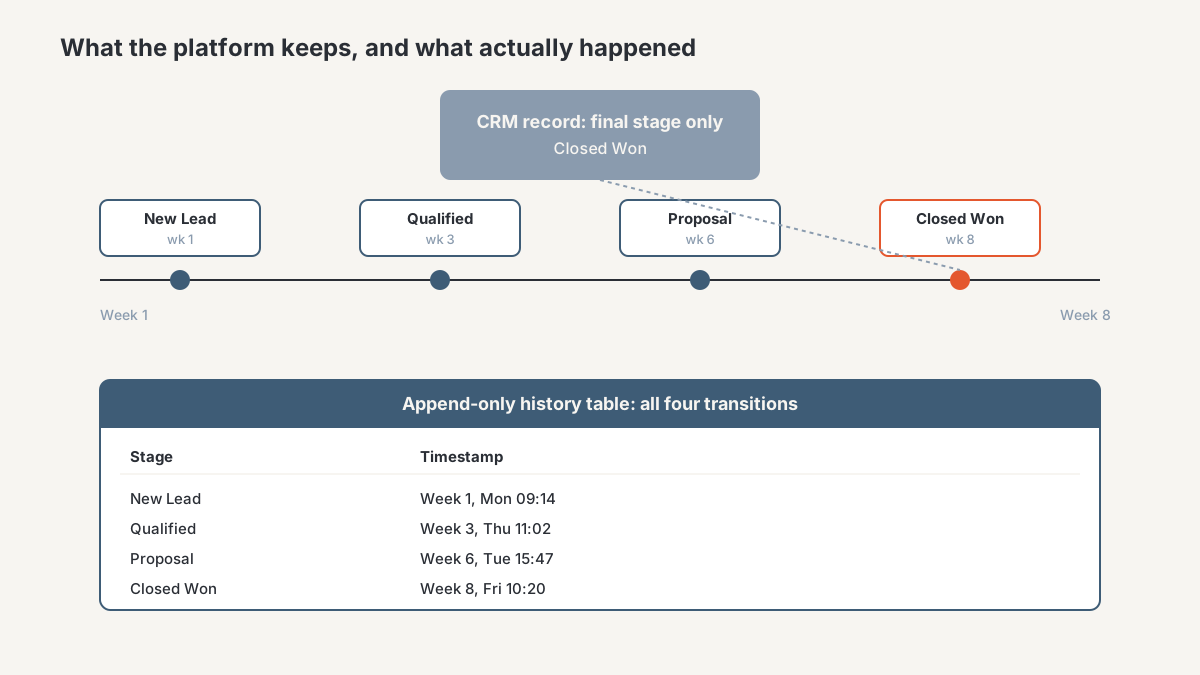
Look at: Pick a date sixty days ago and try to reproduce that day's pipeline by stage, using only the platform.
Good: You have snapshots or a change log outside GoHighLevel and can rebuild it.
Failure: You can't, because the platform stores current state and overwrites the rest.
On the report: This one can't be fixed retroactively. Stage velocity, time in stage, and "what did this look like in Q1" all need data captured while it was still true. History you didn't record isn't recoverable, which makes this the check to act on first even though it feels least urgent.
That overwrite behavior is one of three structural weaknesses I documented in "Your GHL Reporting Is Lying to You", alongside export truncation and ungoverned metric definitions. Those three are why an account can pass most of this checklist and still produce reports nobody can reproduce.
What to do once you've run it
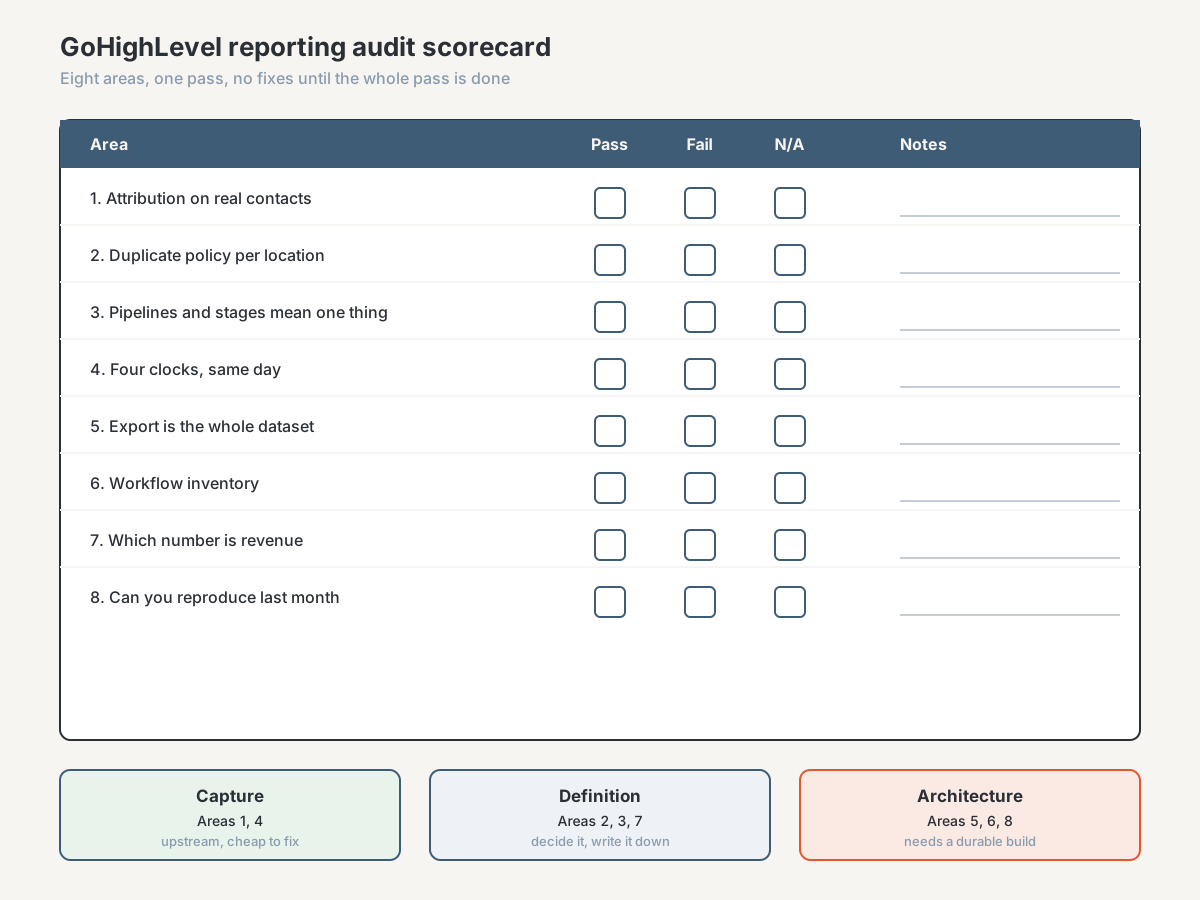
Score each check pass or fail, and don't fix anything until the whole pass is done. Failures cluster, and the cluster tells you what kind of problem you have.
Areas 1 and 4 are capture problems. They sit upstream of the CRM, they're cheap to fix, and fixing them improves your data from that day forward.
Areas 2, 3, and 7 are definition problems. No tool fixes these. Somebody has to decide what a lead is, which stage means money, and what the duplicate policy will be, then write it down where the team sees it.
Areas 5, 6, and 8 are architecture problems. They're telling you that operational data and reporting data are now two different jobs, and that a scheduled export into somewhere durable is the next build. I've documented one implementation path in Export GoHighLevel Data to Supabase, and the reporting layer that sits on top in Build a Multi-Touch Marketing Attribution Model.
Run it quarterly, and after you onboard a client, migrate a sub-account, or rebuild a funnel. Most of what it catches came from a change somebody made for a good reason.
Frequently asked questions
How often should I audit my GoHighLevel reporting setup?
Quarterly for a full pass, plus a partial pass after any structural change: a client onboarded, a sub-account migrated, a funnel rebuilt. Reporting setups don't decay on their own. They break when someone changes something upstream, so tie the audit to changes, not only the calendar.
What's the fastest way to tell if GoHighLevel attribution is broken?
Click your own live ad on a phone, complete the form, then open the contact it created. If the source, medium, campaign, and click ID aren't all on the record, attribution is broken somewhere in that path. It takes five minutes and tells you more than an hour in the settings screens.
Can I audit GoHighLevel reporting without a developer?
Yes. Every check here happens in the interface or in a spreadsheet from an export. A consultant adds speed, and the fixes for the architecture failures at the end, particularly durable history. Finding the problems is an ops job.
Which GoHighLevel reporting problems can't be fixed after the fact?
History, primarily. GoHighLevel stores current state, so stage changes that already happened are gone and no configuration recovers them. Lost attribution behaves the same way: contacts created while a form was leaking UTMs stay unattributed forever. Both argue for fixing capture and starting a durable export before you need the trend line.
Should I fix everything the audit finds?
No. Fix capture first because it compounds daily, then settle the definitions because they cost nothing, then decide whether the architecture failures justify a build. Some agencies genuinely don't need one yet, which I've written about elsewhere.
Get the full audit run for you
Run the checklist yourself. It's written to work without me, and a clean result buys real confidence for two hours of work.
If it comes back messy, or you get partway through and realize you can't answer half the questions, that's what the agency CRM and reporting diagnostic is for. It's a paid, bounded first engagement: I go through your GoHighLevel setup, attribution capture, definitions, and the numbers you report today, then hand back the named causes and a prioritized fix list, including what to leave alone. You keep the findings whether or not you do the work with me.
Book a reporting diagnostic, or see how I work with performance-marketing agencies on CRM and reporting data.
About the author. Ahmed Abdelkhalek is a Data Automation and Reporting Consultant and the founder of ChromiumData, a founder-led consultancy building reliable reporting and connected data workflows for performance-marketing agencies. He works with clients directly from diagnosis through delivery, mostly at the unglamorous end: CRM data that won't reconcile, reports rebuilt by hand every month, pipelines that break quietly after launch. He holds the AWS Certified Solutions Architect Associate and Microsoft PL-300 certifications. More at chromiumdata.com/author/ahmed-abdelkhalek.