A client running a trading-education business had built out their GoHighLevel account over several years: admissions calls, paid workshops, an upsell sequence, nurture campaigns, an AI assistant handling replies. By the time I looked at it, the account held 169 workflows. GoHighLevel's own workflow list shows names, folders, and a publish toggle. It doesn't show which workflows depend on each other, which ones touch the same pipeline stage, or which ones are quietly working against one another.
That gap is where I built the tool behind this audit, and it's also where I found the problem worth writing up: a live workflow that was silently turning the client's AI chatbot back on for leads someone had deliberately taken off it.
Why a 169-Workflow Account Outgrows the Native List
Nothing in GoHighLevel throws an error when two workflows disagree. Rename a pipeline stage and six workflows keep firing on a condition that no longer exists. The account looks fine. Nothing turns red. A new nurture sequence flips the AI assistant back on for any contact reply, including the leads a human just took off automation, and there's no log entry that says "conflict." It shows up later as a lead getting the wrong message, or a support request nobody can trace to a cause.
At 169 workflows, reading through GoHighLevel's builder one automation at a time to catch that stops being realistic. The client needed a real answer to three questions: what exists, what depends on what, and what's actively fighting itself.
Building the Catalog GoHighLevel Doesn't Give You
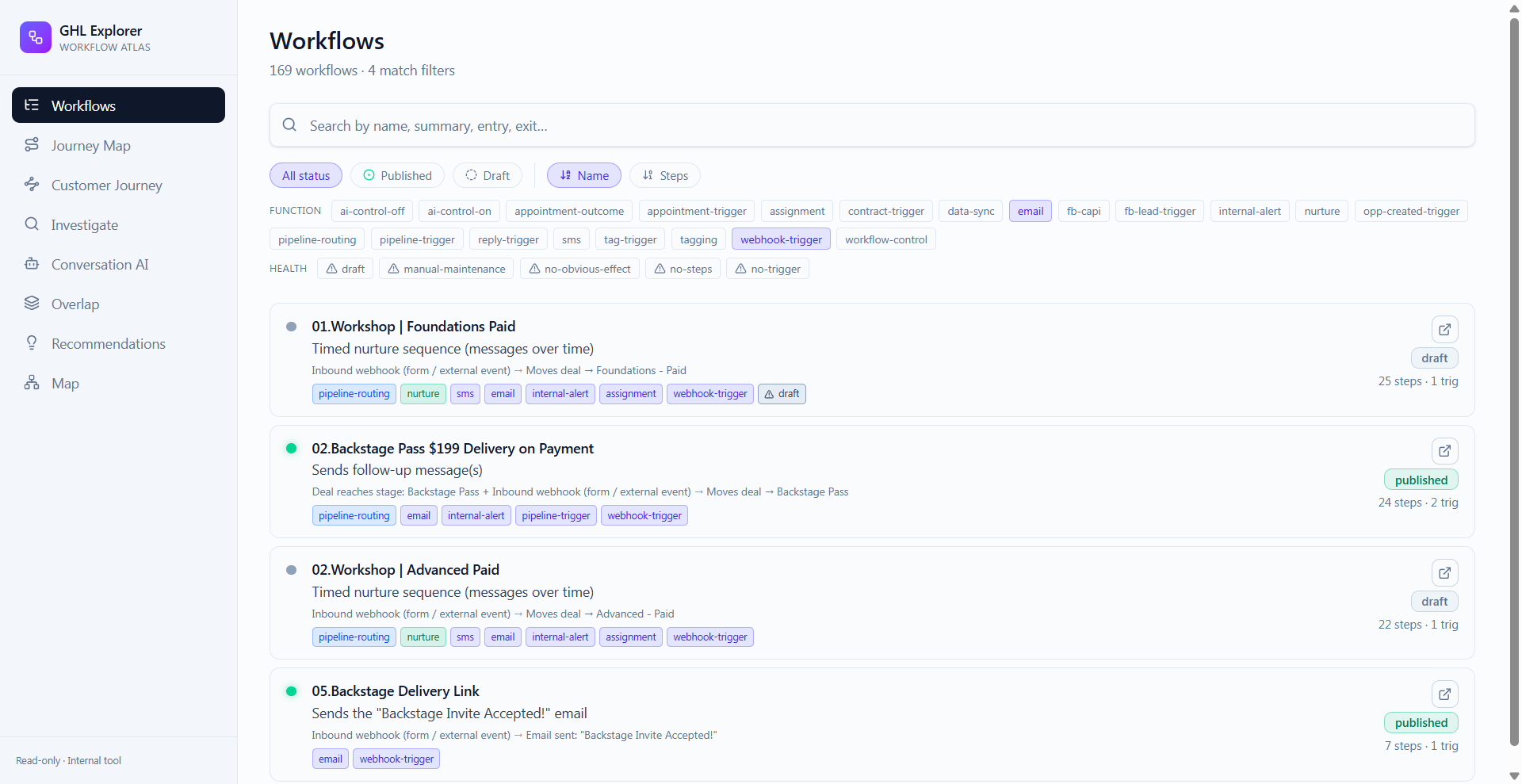
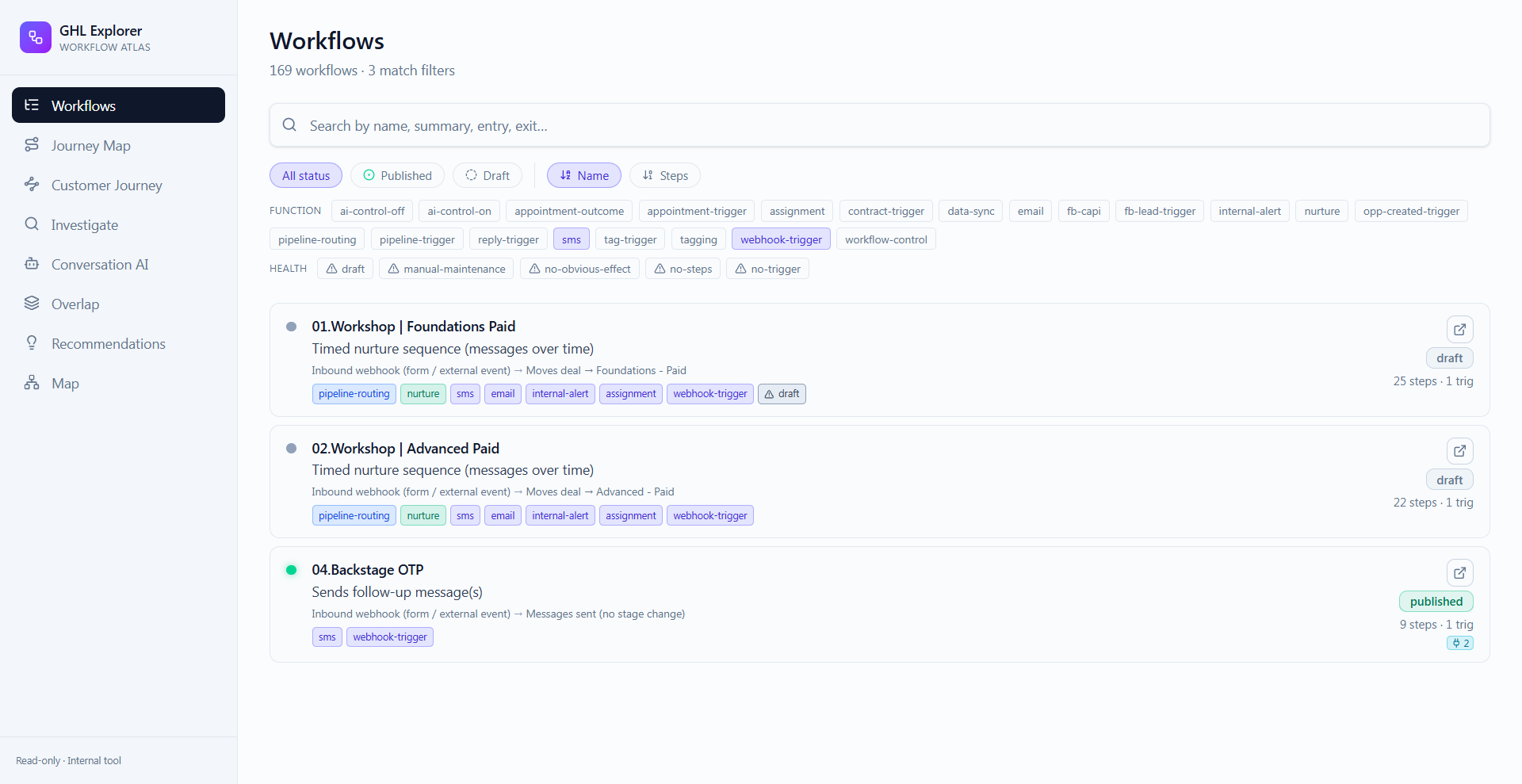
I pulled the account's workflow data through GoHighLevel's API into Supabase and built a small, read-only web app around it. Every workflow's trigger, exit condition, step count, tags, and publish status became searchable in one screen, something the native list never lets you do.
The tags do the real work. Every workflow gets labeled by function: SMS, email, pipeline-trigger, webhook-trigger, assignment, tagging, AI control, and more. A question like "which workflows send SMS" or "which ones touch the AI" turns from an afternoon of manual reading into a five-second filter. On top of that sit health flags (draft, no-trigger, no-steps, no-obvious-effect, manual-maintenance) that catch the automations which look wired up but quietly do nothing, or that only run correctly because someone remembers to trigger them by hand.
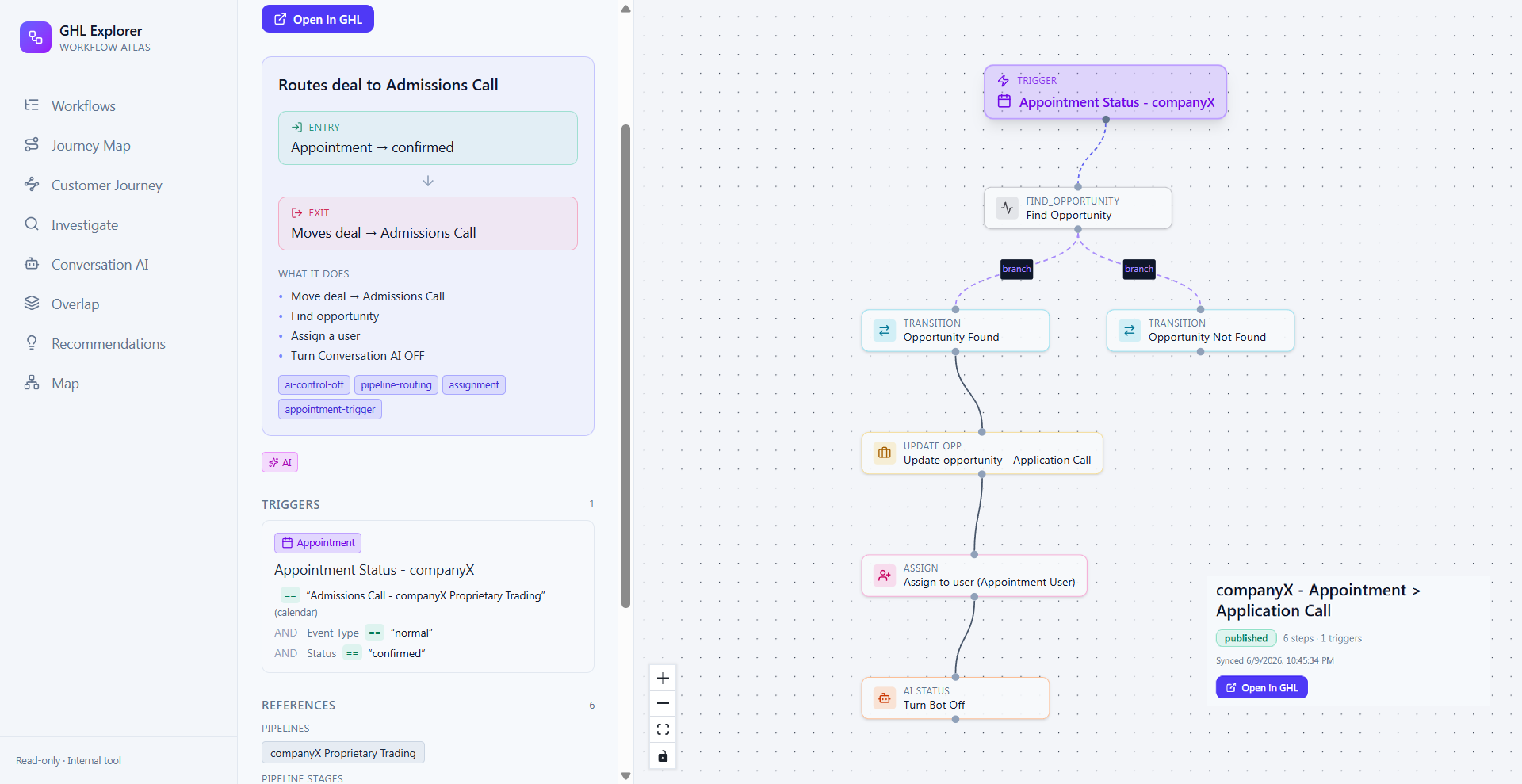
Click into any one workflow and you get the plain-language version of what GoHighLevel's builder shows as a wall of connected nodes: the entry condition in one line ("Appointment → confirmed"), the exit event in one line ("Moves deal → Admissions Call"), a short "what it does" summary, and a node graph pulled from the workflow's actual logic (trigger, branch, transition, assignment, AI status change), so the shape of it is visible without opening GoHighLevel at all.
Following Contacts Through the Account, Not Just Workflows in Isolation
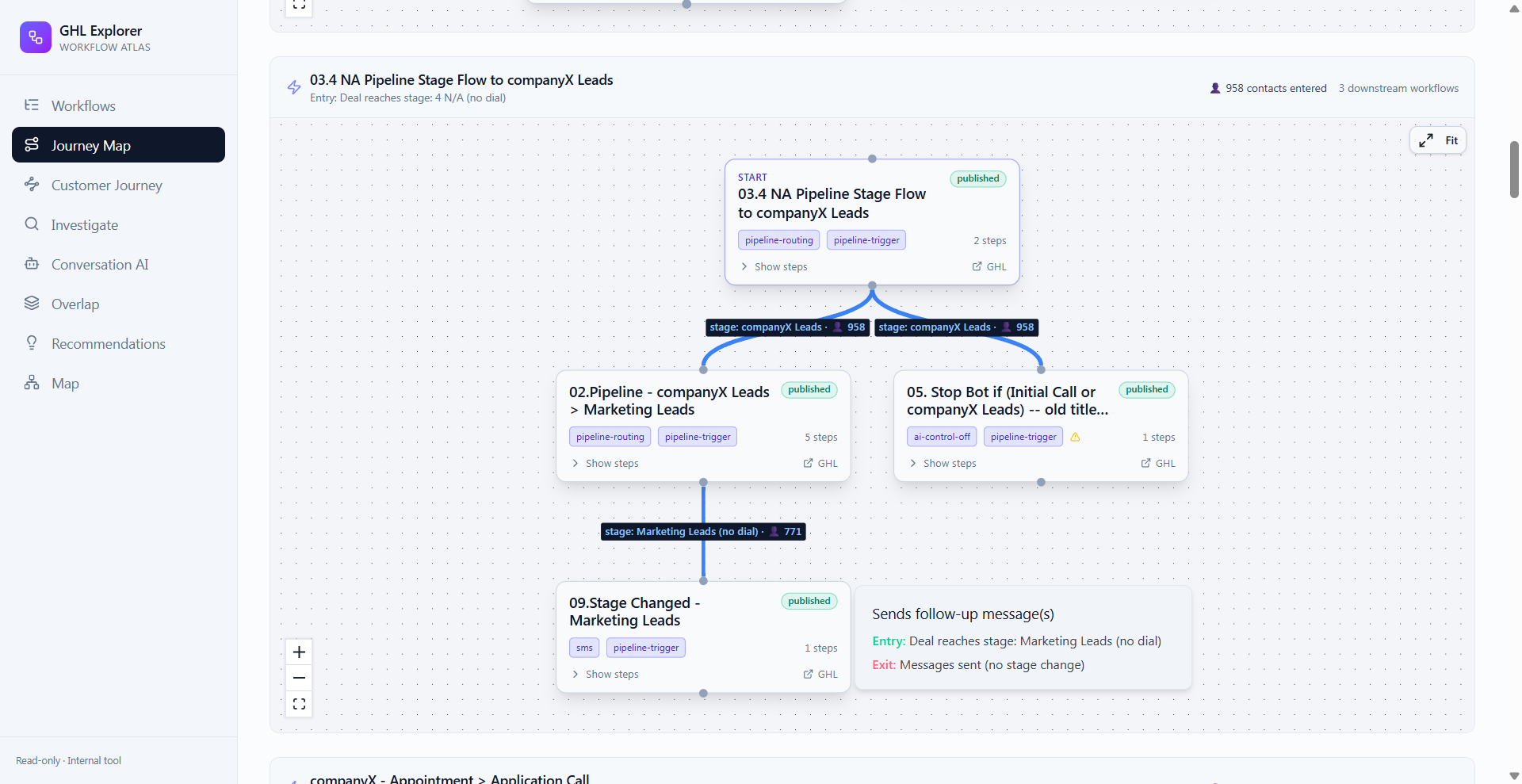
A workflow list, however complete, still treats each automation as its own island. The question the client actually cared about was: what happens to a contact after they hit a given pipeline stage? I built a Journey Map to answer that directly. Pick a pipeline-stage transition and it draws every downstream workflow that fires from it, with real contact volume pulled from the account's own data. One flow showed 958 contacts moving through a lead stage and splitting into two different paths depending on whether an opportunity record already existed.
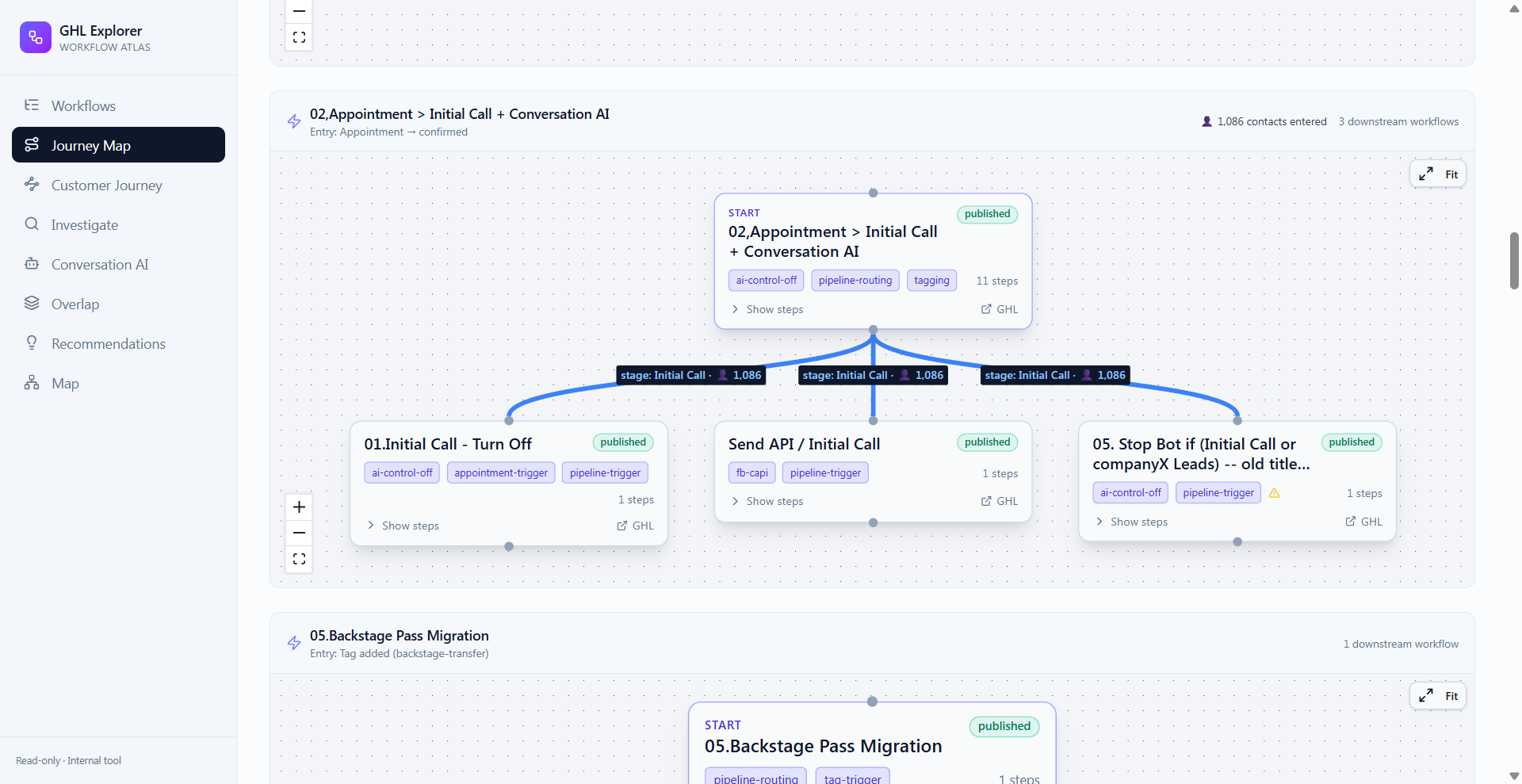
A second view of that same map showed 1,086 contacts entering an "Initial Call" stage and hitting three separate workflows at once, one of which turned the AI assistant off. That kind of detail stays invisible until contact volume is visible flowing through the account, not just workflow names sitting on a list.
The Conflict This Process Was Built to Catch
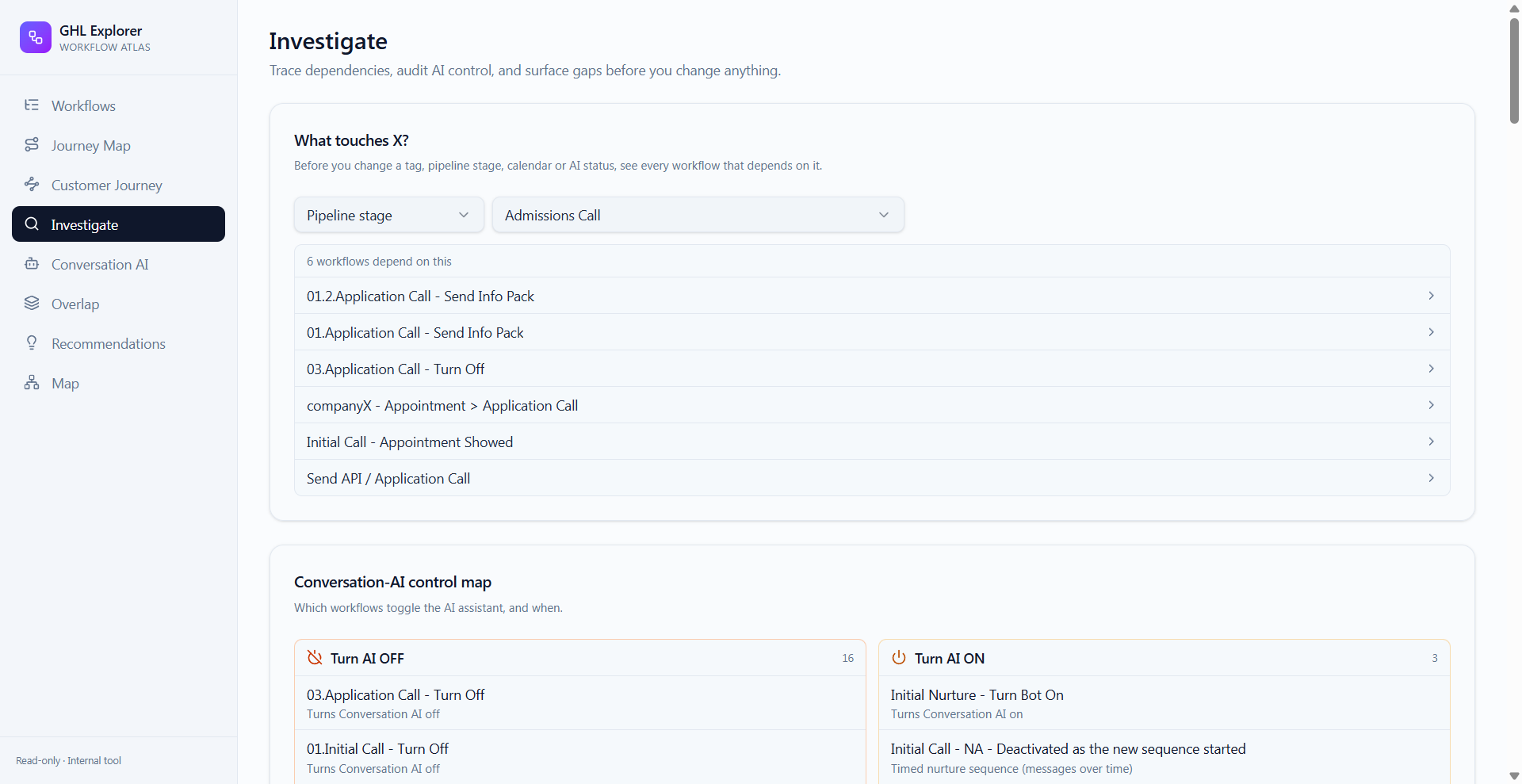
Two views exist specifically to catch what the native builder can't flag on its own.
The first, Investigate, answers "what touches this?" before anyone touches anything. Pick a pipeline stage, a tag, or a calendar, and it lists every workflow that depends on it: six workflows keyed off the Admissions Call stage alone. That's the difference between renaming a stage with confidence and renaming it, then spending a week finding out what quietly broke downstream.
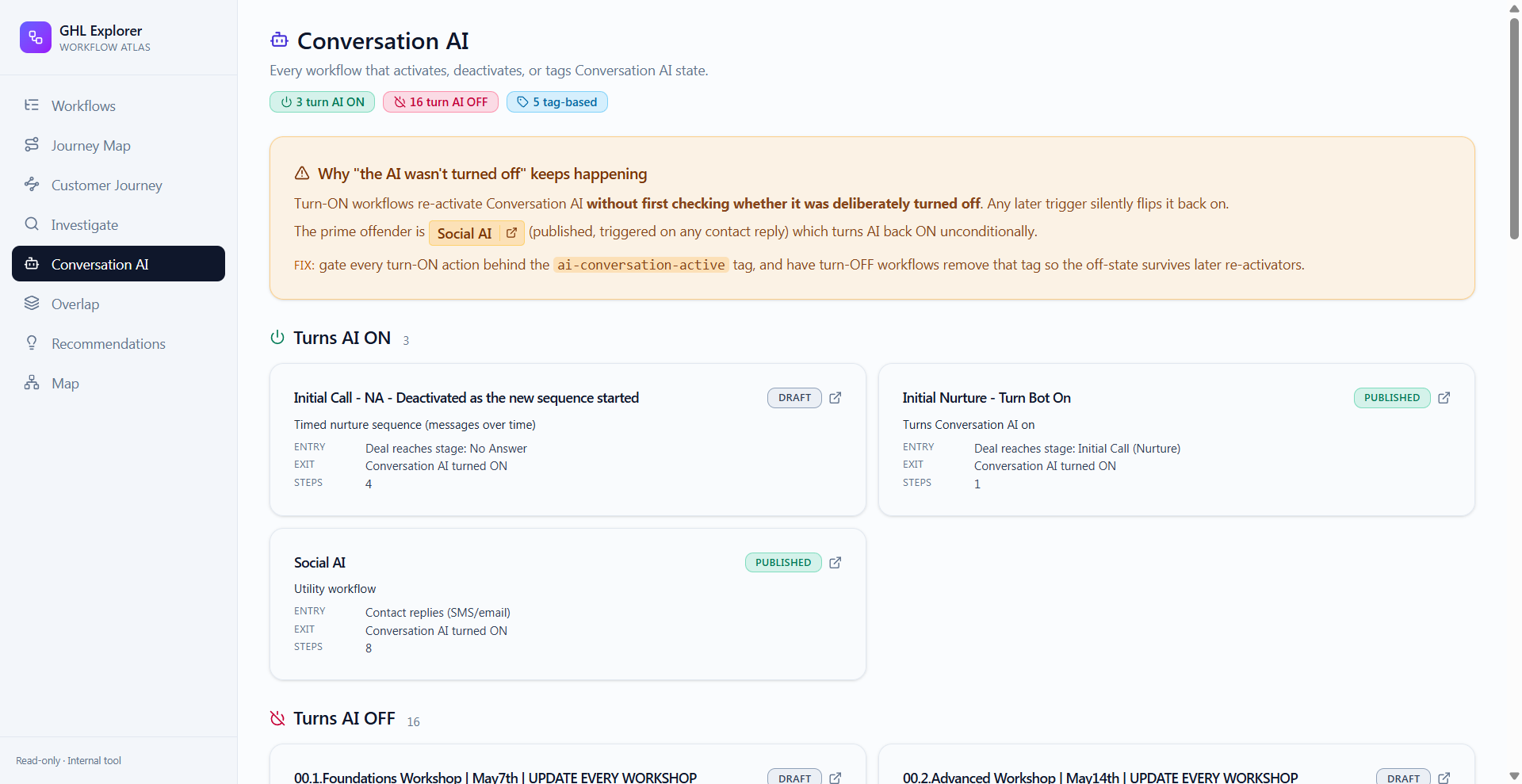
The second is a control map of every workflow that turns the AI assistant on or off: 16 that turn it off, 3 that turn it on, 5 more gated by tag. Laid out next to each other, one conflict became obvious immediately: a published workflow turned the AI assistant back on for any contact reply, with no check for whether a human had deliberately silenced it first. Any lead a team member had manually taken off the bot would get put back on it the moment they replied. GoHighLevel would never flag that on its own: the workflow does exactly what it was built to do. It's only a conflict once every AI-control workflow is visible in one place, which the native builder doesn't offer.
GoHighLevel would never flag that on its own: the workflow does exactly what it was built to do. It's only a conflict once every AI-control workflow is visible in one place.
From Audit to Action
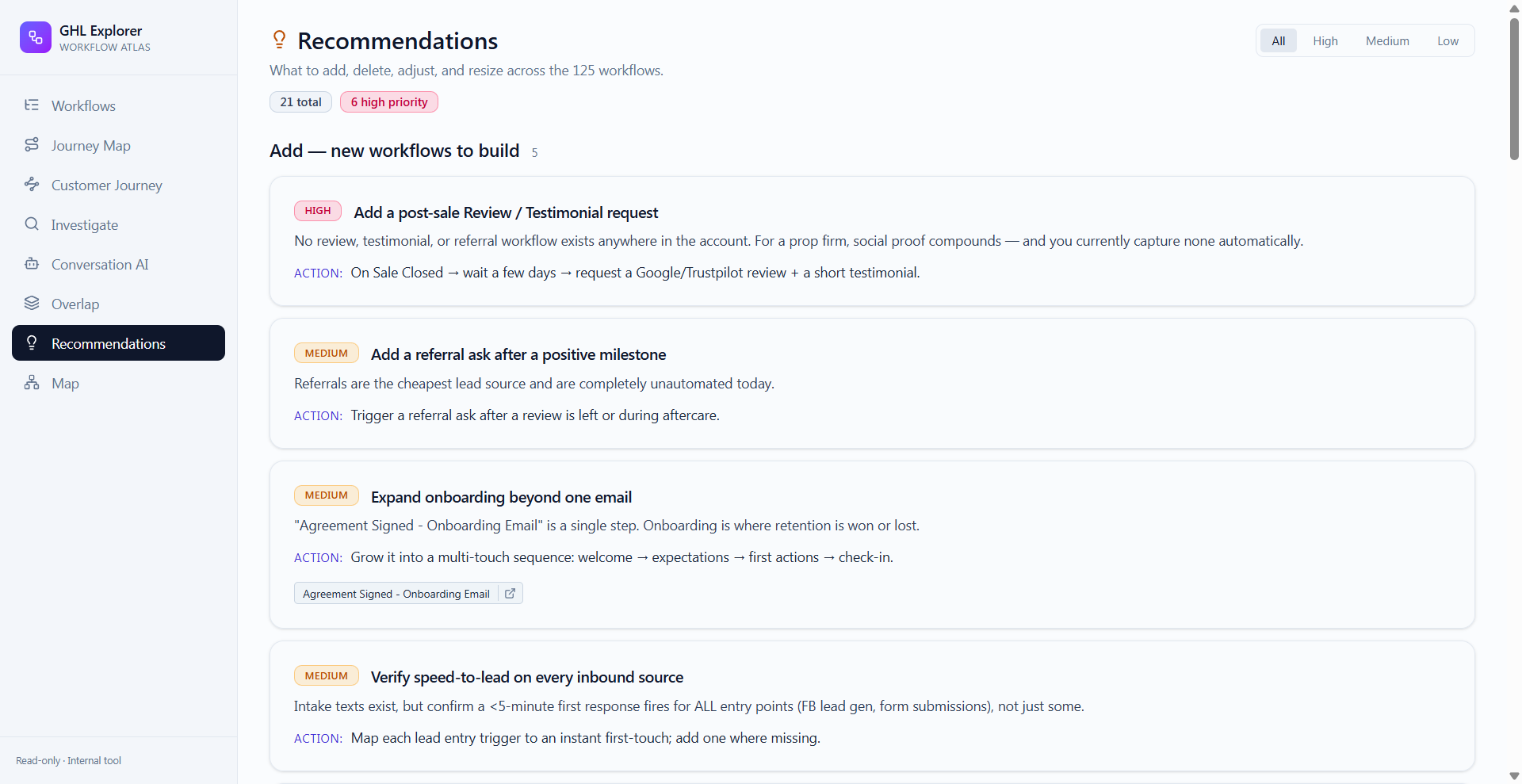
A list of problems only helps if it comes with what to do about them. The Recommendations view turned the audit into 21 concrete, prioritized fixes across the 125 workflows worth acting on, six of them flagged high priority. Some were structural gaps: no post-sale review or testimonial request existed anywhere in the account, and social proof is exactly what a trading-education business needs to convert new leads. Others were smaller: onboarding ran through a single email instead of a sequence, and speed-to-lead response wasn't confirmed across every inbound source, only some of them.
A companion Overlap view does the fourth thing this kind of account always needs: it finds workflows that do the same job under different names, the duplicates that build up in any account touched by more than one person over a few years.
What Made This Harder Than It Looks
The build itself wasn't the hard part. Staying accurate to what GoHighLevel's API actually returns was. Trigger conditions, step data, and pipeline-stage references had to be normalized before the summaries and node graphs could be trusted, because the raw data describes an automation's plumbing, not its intent. Getting the "what it does" line right for 169 workflows meant reading real trigger and action data instead of guessing from titles, and titles lie. One workflow in this account was literally named "Stop Bot if (Initial Call or companyX Leads) — old title...", which is exactly the kind of name that tells you nothing true about what the workflow currently does.
The result wasn't a spreadsheet of workflow names. It was a searchable map of an account the client had been running mostly blind in for years, a dependency check they can run before touching a stage or tag, and one live conflict caught before it caused more damage: an AI assistant silently overriding a human decision to take a lead off automation.
Who This Audit Is For
This particular account had 169 workflows, but the same blind spot usually starts earlier than that. Past roughly 50 workflows in a single GoHighLevel account, no one person can hold the whole thing in their head anymore, and most of the time nobody notices until something breaks.
Marketing agencies hit this first, and worse, because it multiplies. An agency running ten client sub-accounts doesn't have one 50-workflow problem, it has ten of them, each built by whoever set that client's account up, each with its own untracked conflicts. GHL freelancers and consultants run into the same wall from the other side: you inherit a client's account built by two or three people before you, half of it undocumented, and you're expected to make safe changes to it starting day one. An audit like this is the fastest way to find out what you actually inherited before you touch anything in it.
If that's you — an agency managing several sub-accounts, a freelancer taking over someone else's build, or a solo account that's quietly grown past the point anyone can explain it end to end — this is the audit built for that.
To run it against your account, I'll need read access to your GoHighLevel sub-account: an API key or a login with visibility into your workflows, pipelines, and calendars is enough. I won't make changes without your sign-off. If you're an agency, I run this per sub-account, since conflicts and duplicates don't roll up cleanly across accounts even when the workflows were copied from the same template. From there you get the same output shown here: a full workflow catalog, a journey map built from your real contact flow, a conflict and duplicate check, and a prioritized list of what to fix first.