By the time an agency owner asks me about GoHighLevel reporting, they've usually stopped wondering whether it's limited. Somebody on the team is rebuilding the same client numbers by hand every month, a client has asked why last month's figure moved, and nobody can say for certain.
So the useful question isn't whether native reporting has limits. It's which limit you've hit, and what to move to, because an agency with four sub-accounts and an agency with forty don't need the same answer.
I'll say up front that plenty of agencies should stay where they are. Graduating early buys you a second system to maintain and not much else.
What GoHighLevel's built-in reporting actually covers
GoHighLevel's reporting is better than its reputation among consultants suggests, and it covers what most agencies need in their first couple of years. Inside a sub-account you get pipeline and opportunity value by stage, conversion reporting, call reporting, appointment reports, source and attribution reporting on contacts, email and SMS engagement, and whatever comes through the connected Google and Facebook ad accounts. At the agency level there's a roll-up across sub-accounts, plus dashboards you can arrange yourself with date ranges and comparison periods. If the job is "show this client what happened in their pipeline last month," that's covered, and it's included in a platform you already pay for.
What it can't see is anything that didn't happen inside GoHighLevel. Website traffic, Shopify or WooCommerce orders, WordPress form fills that bypass a funnel, spend from an ad account nobody connected, money that landed in Stripe under a different customer record. On GoHighLevel's own ideas board this comes up as a repeated request, described as a gap in reporting "because they can't show clients their website traffic … alongside their funnels, CRM, and ad results."
Agencies feel that boundary first and usually misdiagnose it as a reporting fault. GoHighLevel reports on GoHighLevel. Every workaround from here is really a question of where the other systems' data goes to meet it.
Why "custom reports" in GoHighLevel aren't fully custom
The phrase that keeps surfacing on the ideas board and in review commentary is that custom reports "are not truly custom." That's fair, and it's worth being precise about where the ceiling sits.
Custom in GoHighLevel means choosing which pre-built widgets go on a dashboard, which date range they cover, and which sub-account or pipeline they filter to. You're arranging supplied components rather than defining a query, and a few things follow.
You can't join objects freely. Opportunities, contacts, appointments, and conversations each have their own reporting surface, so a question that spans them (how many contacts from a given source booked, showed, then converted inside 30 days) has nowhere to be asked. Calculated metrics are thin: if your definition of a qualified lead involves two custom fields and a tag, that definition lives in someone's head and gets reapplied by hand every month. Custom fields are second-class: filterable in places, but never dimensions you can group and aggregate wherever you want. And metric definitions aren't governed, so two dashboards can both say "conversion rate" while counting different things. I wrote up how badly that last one goes in "Your GHL Reporting Is Lying to You."
None of this makes GoHighLevel a bad CRM. Its reporting layer is a dashboard builder rather than an analytics tool, which is normal for a CRM. Trouble starts when you sell a client on a metric the dashboard builder can't produce, then produce it manually for eighteen months.
How do GoHighLevel's timezone settings distort reporting?
Timezone discrepancies come up constantly in review commentary, and they're the most under-explained item on the list: the symptom looks like a data problem, the cause is a settings problem.
Several timezones are in play at once. The agency account, each sub-account, individual users, calendars, and the workflows evaluating date conditions all carry their own. When they disagree, nothing errors. The reports just quietly diverge.
Two failure modes matter. The first is boundary drift. A conversion recorded at 9pm Pacific is already tomorrow in UTC, so a report bounded by calendar days puts it in a different day, week, sometimes month. Daily numbers wobble, month-end totals stop matching what the client's own system says, and you can't point at a wrong record because no record is wrong.
The second is cross-system mismatch. GoHighLevel renders in one timezone, GA4 in another, the ad platform in whatever the ad account was set to. Reconciling three reports that each define "yesterday" differently is arithmetic nobody has time for weekly. That problem is big enough that I gave it its own diagnostic.
The fix at this stage isn't a new tool. Set every sub-account, user, calendar, and connected ad account to a deliberate timezone, write down which one your reports render in, and tell your clients. In most setups I've looked at, nobody ever made that decision. It was inherited from whoever created the sub-account.
What data gets lost or mangled in GoHighLevel exports?
Export is where the "we'll just do it in a spreadsheet" plan meets reality. Reviewers describe raw GoHighLevel exports as "not ready for direct use," which is accurate and still understates it.
History is the big one. GoHighLevel stores current state, so an opportunity export tells you the stage a deal sits in now, not the stages it moved through or when. Once a deal moves, last month's picture is gone, and a report you ran in June can't be reproduced in August. Stage velocity, time in stage, any cohort view: the data doesn't survive in the platform.
Exports are snapshots rather than feeds. There's no native "email me this file every Monday," so you export by hand or build something on workflows or the API.
Then there's shape. Large exports arrive in chunks, custom fields land in columns that shift as your field set changes, multi-select values come through concatenated, and dates arrive in a text format a spreadsheet will misread. Each is fixable. Fixing all of them by hand every month for every client is what people mean when they describe multi-client reporting as "hours of manual work each month." Sub-accounts also export separately, with no client column to join them, so you stitch that yourself every time.
For the mechanics of pulling opportunities and stage-change history into a durable store, I documented one implementation in Export GoHighLevel Data to Supabase.
Does your GoHighLevel plan limit what you can report on?
Partly, and less than the internet suggests.
On GoHighLevel's published pricing in August 2026, Starter is capped at three sub-accounts while Unlimited and Agency Pro are not. Custom dashboards and reporting are listed on all three tiers. Agency Pro adds user and agent reporting; Enterprise has its own reporting tier.
Starter vs. higher-tier reporting feature gaps
The sub-account cap is the reporting constraint on Starter, even though it doesn't read like one: three sub-accounts means three clients kept properly separate. Agencies work around it by putting several clients in one sub-account, and client-level reporting stops being a filter and becomes a manual segmentation job you redo forever.
Third-party pricing guides often assert that "advanced reporting" requires Unlimited. GoHighLevel's own pricing page doesn't present it that way. Treat reseller pages as unreliable here, and check inside your own account before upgrading on the strength of a reporting promise.
Either way, a higher tier buys separation and seats. It doesn't change what the reporting engine can compute, and it doesn't give you history.
How do you know it's time to graduate beyond native reporting?
Not every agency should move, and the trigger isn't headcount or ambition. It's when one of these becomes true.
- Someone is rebuilding the same numbers manually on a schedule. Once that work has a fixed monthly hour count, replacing it is a build decision with a payback period.
- You've already sold a number the platform can't produce. Cost per booked call across paid channels, say, where GoHighLevel holds the calls, the ad platform holds the spend, and nothing joins them.
- You need history the platform overwrites. Trend, velocity, cohorts and "what did this look like in Q1" all require storing data outside GoHighLevel starting now. History you didn't capture isn't recoverable later.
- Clients have started questioning numbers. When answering "why did that move" takes a day of investigation, a reporting problem has turned into a retention risk.
- Reporting is gating who you can sign. If onboarding a larger client would break the routine, the routine now caps the business.
If none of those is true, stay put and spend the money on delivery instead. Every path below carries setup cost and ongoing maintenance.
What replaces native GHL reporting? Sheets, BI, or a warehouse?
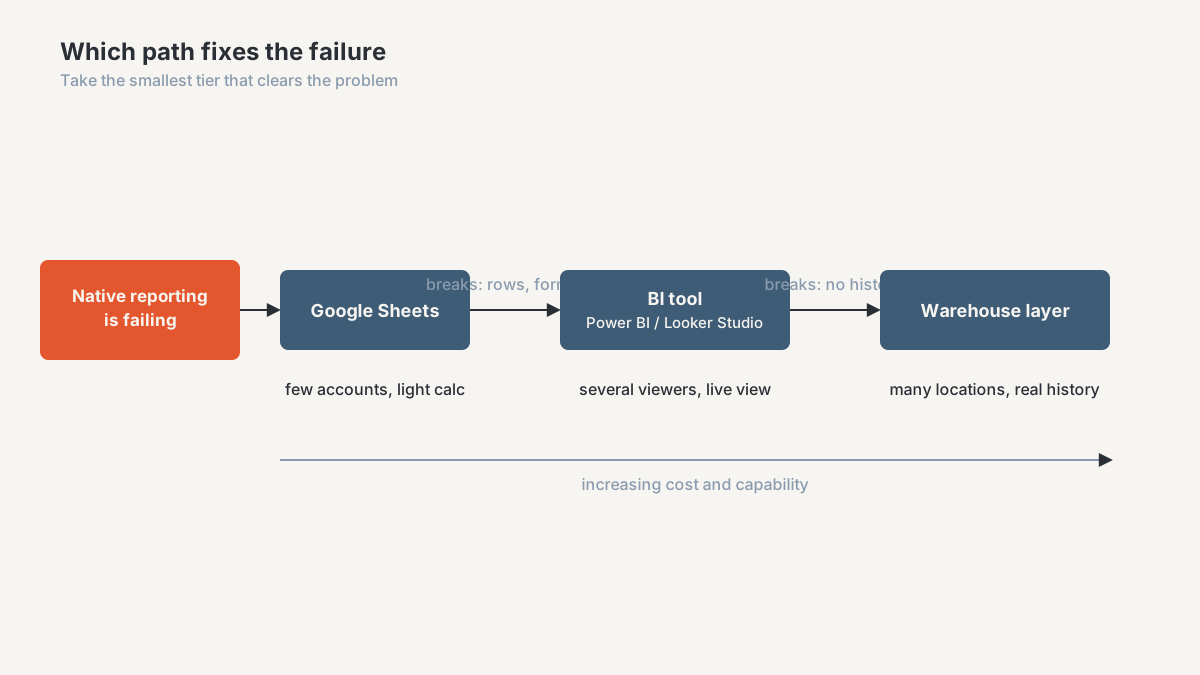
Three paths, in increasing order of cost and capability. Take the smallest one that clears the problem in front of you, and expect to move again later.
Google Sheets: when it's enough
When it's right: a handful of sub-accounts, one or two people producing reports, and a need that's mostly consolidation and light calculation. Sheets is also the only option here your account managers can already use without training, which matters more than architecture diagrams admit.
What you get: scheduled pulls from GoHighLevel into a sheet, joined against ad spend and payment data, with the metric definitions written down in one place instead of reconstructed monthly. An append-only sheet also gives you history, so a daily or weekly snapshot buys back the trend line GoHighLevel discards. A GHL to Sheets reporting workflow is the most common first build I do for agencies, and for a lot of them it's the last one they need.
What breaks later: row counts, refresh time and formula fragility, roughly in that order. The failure that actually hurts is social. The sheet accumulates undocumented logic, and one person understands it, and that person leaves.
BI tool (Power BI or Looker Studio): when you need it
When it's right: several people consume the reporting, clients want an always-current view of their own, or you need visual reporting that doesn't look like a spreadsheet with a logo on it. Looker Studio is the low-friction choice if you're already in the Google stack. Power BI earns its place once the modelling gets serious, which I've compared in Power BI vs. Looker.
What you get: one governed definition of each metric, scheduled refreshes, per-client access, and a real semantic model instead of column arithmetic. This is where "conversion rate" finally means one thing across every client dashboard, and it's the layer I build most often in dashboards and analytics work.
What breaks later: a BI tool is only as good as what you point it at. Aim it straight at exports or a connector and you've bought a prettier version of the same fragility, with no history and no way to reconcile what the connector didn't pull. You'll notice when refreshes fail on schema changes, or when two dashboards disagree and nothing can settle which is right.
Warehouse layer: when data volume or history demands it
When it's right: many sub-accounts, real history requirements, more than two systems that have to reconcile, or contracts where reporting accuracy is a deliverable rather than a courtesy. Also when reporting is something you sell rather than something you throw in.
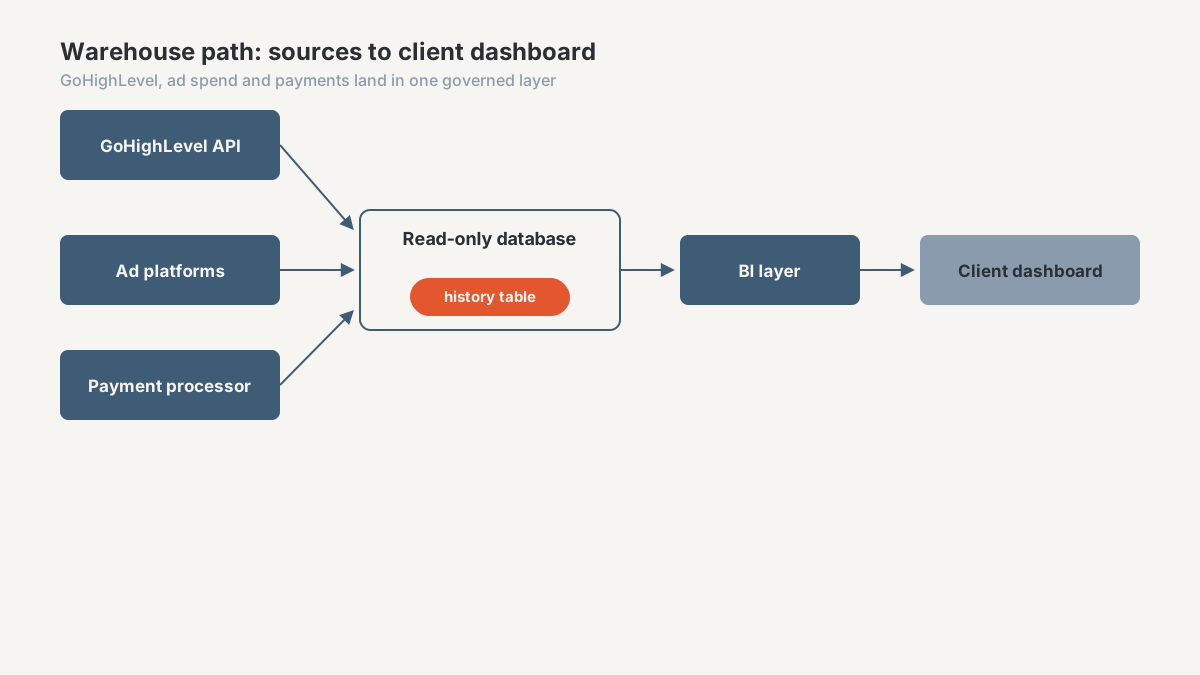
What you get: a read-only copy of GoHighLevel data landing in a database you control, with change history preserved, joined to ad spend, payments and web analytics, feeding whatever BI layer sits on top. Reports become reproducible. You can answer "what did this look like on 31 March" because 31 March was written down. That's the architecture behind the Supabase build, and the shape of most data solutions work at this scale.
What breaks later: it's software, and software needs an owner. Sync jobs fail, the API changes, schemas drift, and somebody has to notice. Agencies that adopt a warehouse without deciding who maintains it end up with an expensive stale copy of their data, which is worse than no copy, because people trust it.
Frequently asked questions
Can GoHighLevel custom reports combine data from multiple sub-accounts?
There's roll-up reporting at the agency level, so you can see aggregate performance across sub-accounts. What you can't do is build an arbitrary cross-sub-account report with your own definitions, segments and calculated metrics. Once you need that, you're consolidating outside GoHighLevel.
Why do GoHighLevel report totals change after the fact?
Usually one of three causes. Deals moved stages and the report reflects current state rather than the state when you first ran it. Contacts were merged or deduplicated, collapsing two records into one. Or a timezone boundary is shifting events between days and periods. The first two are the platform working as designed; the third you can fix.
Does GoHighLevel support scheduled report exports?
Not as a native "email me this CSV every Monday" feature. You can trigger data out through workflows or build against the API, which is what most scheduled reporting setups end up doing. If you need a file landing reliably in the same place at the same time, plan on building it.
What's the difference between a GHL dashboard and a real BI dashboard?
A GoHighLevel dashboard arranges supplied widgets over live platform data. A BI dashboard sits on a data model you define, where you control the joins, the metric definitions, the history and which sources are included. The visible difference is that a BI dashboard can answer questions about data GoHighLevel never held, and can reproduce a number from six months ago.
Is upgrading my GoHighLevel plan enough to fix reporting limits?
If your constraint is the sub-account cap or per-user reporting, then yes, a higher tier addresses it. If your constraint is that custom reports aren't custom enough, that history gets overwritten, or that your data lives in five systems, then no. Those are properties of the reporting engine rather than of your plan.
Find out which reporting path fits your agency
Most agencies are one path away from where they think they are. The ones convinced they need a warehouse often need a timezone audit and a well-built sheet; the ones patching spreadsheets have usually needed a real data layer for a year.
The agency CRM and reporting diagnostic settles that with evidence instead of opinion. I go through your GoHighLevel setup, the numbers you report today, and where they disagree with your ad platforms and payment records, then tell you which path your situation calls for, including when the answer is to change nothing. If you run reporting for marketing clients, agency data ops is where that work lives.
About the author. Ahmed Abdelkhalek is a Data Automation and Reporting Consultant and the founder of ChromiumData, a founder-led consultancy. He works directly with marketing agencies and operations teams on CRM data quality, reporting automation, and keeping numbers consistent after launch. More at Ahmed Abdelkhalek.