Picture a webhook feeding a reporting table. Stage changes flow from GoHighLevel into a database, a dashboard reads from it, and it works fine for months. This is a composite of the failure mode I keep running into, not one traceable incident.
Then someone rebuilds the workflow holding the webhook action, and the new version has a filter above it. A chunk of stage changes stop being sent. Nothing errors and the pipeline chart looks plausible. Nobody finds out until a client asks why a stage shows fewer deals than the account manager remembered closing.
Webhook integrations rarely fall over. They go quietly incomplete while everything downstream keeps producing numbers.
Webhooks turn up in most of what I write about GoHighLevel reporting, usually as one line: fire a webhook from a workflow into a store you control. This is the mechanism itself, and what the receiving end owes you.
What is an outbound webhook, and how is it different from an API pull?
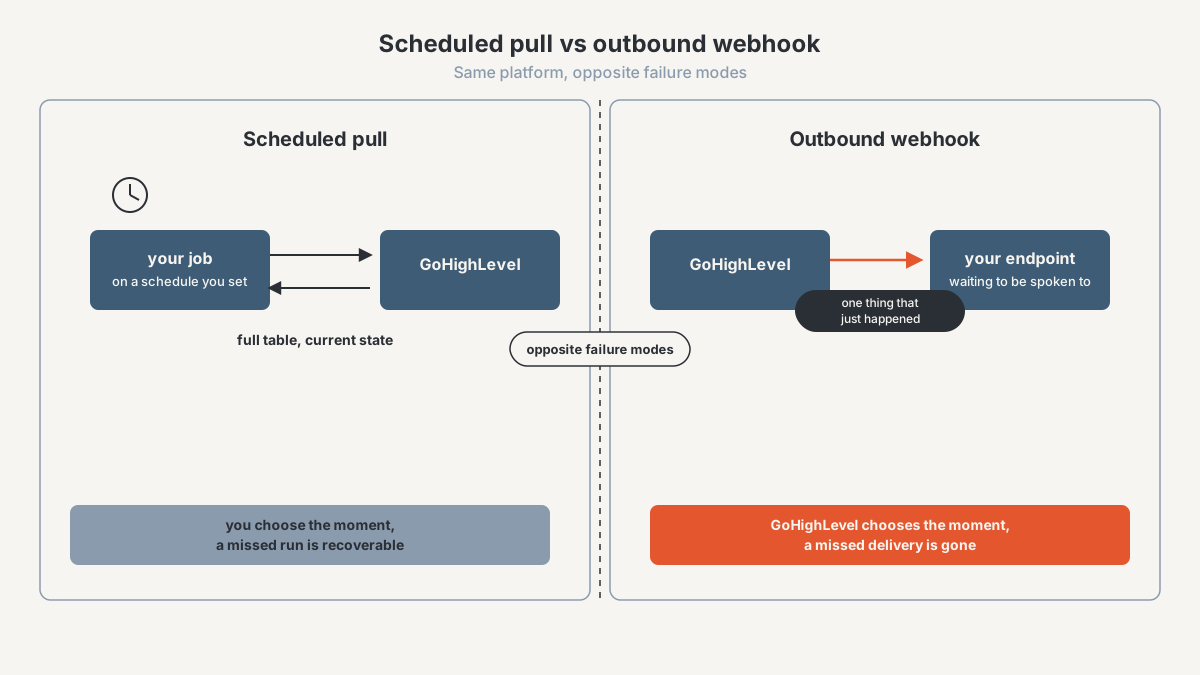
An outbound webhook is GoHighLevel making an HTTP request to a URL you own, at the moment something happens in the account. Your server sits waiting and GoHighLevel decides when to speak. An API pull runs the other way: your code asks for data on a schedule you set, gets a response, and writes it down.
"Outbound" is relative to the sender, which trips people up, since GoHighLevel workflows also have an inbound webhook trigger where an external system calls in. Same mechanism, opposite direction.
The difference that decides your architecture is who owns the failure. With a pull, missing data is your problem and it is recoverable: a job that dies at 2am leaves a gap you can see and re-run at 9am, because the records are still sitting in GoHighLevel. With a push, missing data is gone. If your endpoint was down after an unrelated deploy, the event happened, was sent, was not received, and no second copy exists. A pull is a script. A webhook is a service, with uptime obligations attached.
The second difference is what each one sees. A pull sees state, what is true when you asked. A webhook sees transitions, the only way to know something moved, when, and in what order. A nightly opportunity pull cannot tell you a deal went through three stages on a Tuesday, the whole subject of what GoHighLevel overwrites when a deal moves.
Where does GoHighLevel put webhook configuration, and what can fire one?
A webhook here is a workflow action, not an account-level setting. You build a workflow, give it a trigger, and add an action that sends an HTTP request to a URL you provide. Three things follow, and each has caused a problem I have had to unpick.
It inherits the workflow's trigger and every filter above it, so your integration's coverage is defined by workflow logic somebody can edit without knowing a database depends on it. That is the failure described above, and nobody involved did anything wrong from their point of view. They edited a workflow.
It lives inside a sub-account, so onboarding a client means building the workflow there too, or that client's data never starts arriving. No error exists, because nothing was ever configured to fail.
It has no monitoring of its own. A failed dataset refresh writes an error somewhere; a workflow action that stops being reached writes nothing.
Any trigger can fire one, since the webhook is an action further down. The useful ones for reporting are contact created and updated, form and survey submissions, appointment booked and status changed, opportunity stage or status changed, payment events, and message events.
Check one behaviour in your own account first: whether the trigger fires for changes made through the API, through bulk actions, and through imports, or only for changes a human makes in the interface. Integrations that pass testing and miss every bulk update are common, because testing gets done by clicking.
The builder UI and trigger inventory have both changed across versions, so verify on your publish date where the webhook action sits in the workflow builder and what it is called, whether GoHighLevel offers any account-level or app-level webhook subscription outside workflows, and which triggers exist by name. This section describes the mechanism rather than a menu path for that reason.
What is actually in the payload?
A JSON body, sent as an HTTP POST, holding the object that triggered the workflow plus identifiers for the account it came from. Past that it varies by trigger: a contact event carries contact fields, an opportunity event carries the opportunity and usually its contact. Four properties shape how the receiving code should be written.
Custom field keys are not stable if you key on labels, because somebody will rename a field in April. Store the identifier and keep the label as a lookup, the reasoning behind having a stage dimension in the Supabase and Power BI architecture.
The payload is a snapshot, not a diff, and this catches everybody building stage history. A stage-change event tells you the stage the opportunity is in now, and may not tell you the one it left, because the platform overwrote that field before the webhook fired. If your event log needs a from-stage, derive it from the last stage you recorded for that opportunity — the exact build in the stage movement history build.
Payload shape moves. Fields get added, nesting changes, and a parser written against today's structure can start dropping values without failing. Store the raw body exactly as received and parse from your stored copy, so a field that matters six months later can be reprocessed.
You can add fields deliberately. GoHighLevel lets you attach custom data so the receiver knows which client, environment, or workflow version sent it. Do this: an explicit workflow identifier makes a partial outage diagnosable in one query.
Treat any specific field list as something to confirm on the day you build, not something to copy from an article: verify the current payload schema per trigger type, whether custom fields arrive keyed by ID or by name, whether stage-change events include a previous-stage value, and what custom-data or custom-header options the webhook action exposes against the live docs before you publish anything specific.
Why does the receiving endpoint need to verify who is calling?
Because by default the URL is the only secret, and a URL is a terrible secret.
An unverified endpoint accepts a POST from anyone who knows the address, and addresses leak in ordinary ways: a screenshot inside a Loom walkthrough, a contractor who still has sub-account access. That takes no attacker, only normal agency operations.
What it costs depends on what your endpoint does. If it appends to a reporting table, someone can write rows into your client's reporting data that you cannot tell from real ones. If it triggers an action, anyone with the URL can make your systems do that thing, repeatedly.
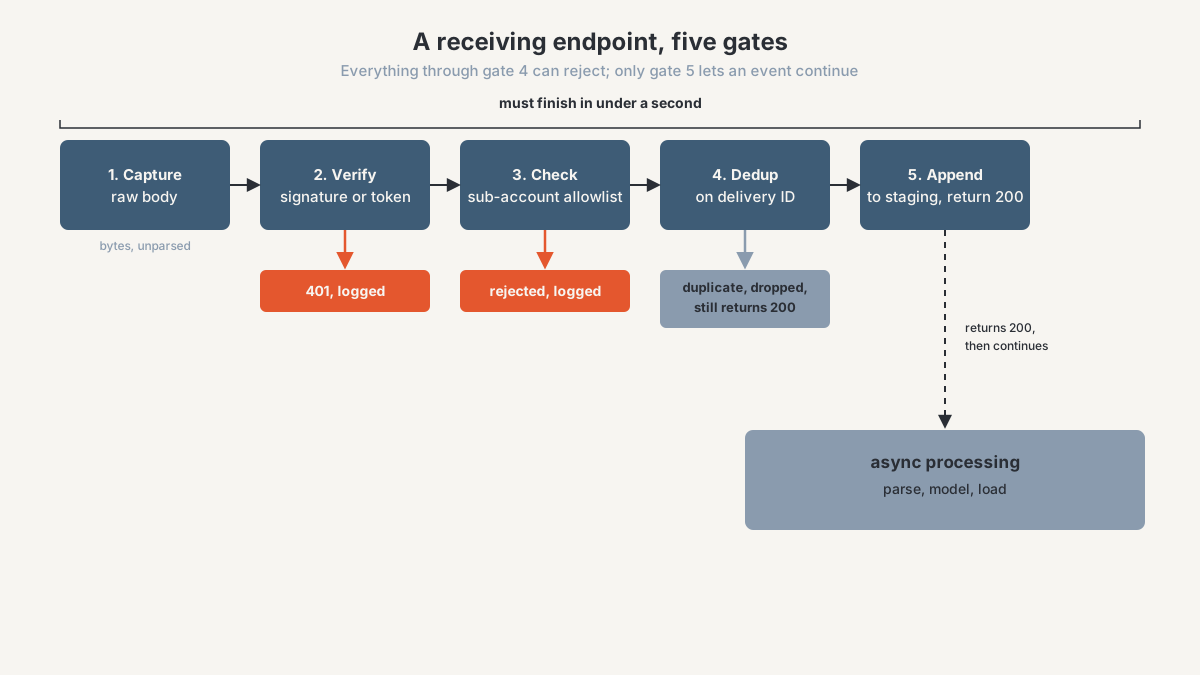
The strongest verification is a signature over the request body: the sender computes an HMAC of the raw bytes with a shared secret and sends it in a header, and you recompute and compare with a constant-time comparison. One trap costs an afternoon if you meet it late: compute over the raw bytes as received, before any parsing and re-serialisation, because reserialising changes whitespace and key order and your signature will never match.
Below that is a shared token in a custom header: replayable by anyone who captures one request, so weaker, but it takes ten minutes. If you do one thing after reading this, do that.
Then a check that is not about authenticity. Verify the sub-account identifier against your list of accounts you serve, so a correctly signed event from a client who offboarded in March stops writing rows into your model.
Reject failures with a 401 and log it. Quick implementations return 200 to everything, and then a rotated secret looks exactly like normal operation.
Confirm before you build on it: verify whether GoHighLevel signs outbound webhook requests natively, and if so the header name, the algorithm, and where the secret or public key is found. If it does not, say so plainly to whoever's reviewing the build and default to the custom-header token instead.
What happens when a delivery fails, and why must the endpoint be idempotent?
Assume at-least-once delivery. That is the honest contract for every webhook system I have worked with, and designing for anything stronger is how you end up with duplicated rows.
An event may arrive more than once, and your endpoint has to make the second arrival cost nothing. Duplicates are not exotic: your endpoint writes the row then times out before returning 200, so the sender treats it as a failure and sends again. Or somebody replays deliveries from a log while investigating a gap, which is exactly what you want to be able to do.
The fix is a deduplication key with a unique constraint behind it. If the request carries a delivery or event ID header, use that. If not, hash the fields inside the payload that define the event, never the time you received it, which differs between the original and the retry and defeats the whole thing. Unique index, insert, swallow the conflict. The full schema for this pattern, delivery log and dead-letter queue included, is worked through in the stage movement history build.
Side effects need the same treatment. If your endpoint sends a message or creates a task, the dedup check happens before the side effect, or a retry is silent in your data and loud in the client's inbox. That is the partial-failure problem I described for automation platforms in Make vs Zapier vs n8n.
Two rules about the response. Return 2xx quickly and do the slow work afterwards, because a sender waiting on your database transaction will time out and treat a successful delivery as a failure. And fail honestly when you cannot accept: a 500 during a database outage may earn you a redelivery, while a 200 guarantees the event is lost.
Retry behaviour itself is worth confirming rather than assuming: how many attempts GoHighLevel makes on a failed delivery, what backoff it uses, what response timeout counts as a failure, whether a delivery ID header is sent, and whether repeated failures disable the webhook or the workflow. These are exactly the numbers that change, so confirm against live documentation before publishing anything specific about them.
How do you tell whether a webhook is still alive?
You will not notice on your own. A dead webhook looks identical to a quiet week, and the dashboards built on it keep opening and keep showing numbers. Three layers, catching different failures.
A delivery log
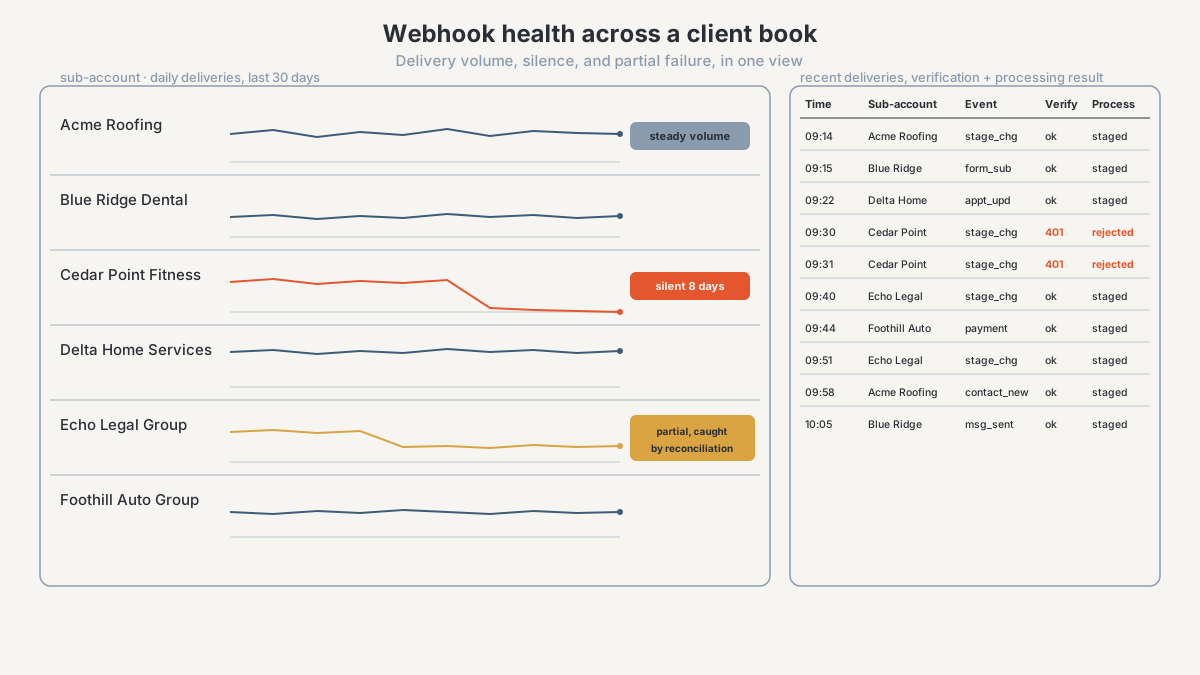
One row per received request, written before parsing: timestamp, sub-account, source IP, whatever event identifier the payload carries, the raw body, and the verification and processing outcomes.
Log the rejects too. A run of 401s is the signature of a rotated secret or somebody pointing a test workflow at production. Without a log, "did the event arrive and fail to process, or never arrive at all" has no answer, and the two have different fixes.
An alert on silence
This is the inverted alert, and almost no monitoring setup does it by default. You are alerting on the absence of an expected event inside a window, per sub-account.
Set the threshold from observed volume rather than a round number. A client generating forty events a week can carry a 48-hour silence threshold. A client generating three a week cannot, and the same threshold on both fires alarms for a healthy integration until everyone ignores them. Low-volume accounts want a weekly coverage check instead.
Reconciliation against a scheduled pull
Silence alerts catch total death. They miss the failure I opened with, where the webhook is alive but a rebuilt workflow means it now sends half of what it should. Volume looks fine and the data is wrong.
Only an independent source catches it: a nightly pull of the opportunity table, compared against what your event log says the state should be, disagrees the morning after a partial outage rather than during a client dispute in November. That reconciliation is the ingestion-layer argument in the durable reporting architecture.
Underneath all three sits a register of which sub-accounts have which webhook installed. Monitoring only alerts on integrations that exist.
When is a webhook right, and when is a scheduled pull safer?
Choose by what the data has to guarantee.
Use a webhook when you need the moment. Transitions and durations exist only as events, and a periodic pull cannot reconstruct them. Anything the platform overwrites belongs here: a stage change, a field edit, a status flip. If it is not captured as it happens, nobody can recover it later. The other case is latency: routing, notification, and anything a human is waiting on.
Use a scheduled pull when you need completeness. Loading a full table, backfilling a new client's history, picking up records corrected after the fact, or anything where a missing row hurts more than a late one. A pull is also right when the receiving side cannot promise uptime, which is the honest assessment of a script on a small server.
Use both when the data is load-bearing, meaning a client sees it or an invoice depends on it. The two fail in opposite directions, so each checks the other.
What I would not do is run webhook-only capture for anything a client will audit. A table missing an unknown number of rows is harder to defend than one honestly a day behind. A worked version of the split sits in the stage movement history build, over the ingestion pattern in exporting GoHighLevel data to Supabase.
Frequently asked questions
Does GoHighLevel have outbound webhooks?
Yes, as a workflow action rather than an account-level setting. You choose a trigger and add an action that sends an HTTP request to a URL you control. Its coverage therefore depends on that workflow's filters, and it has to be installed in each sub-account separately.
What data does a GoHighLevel webhook send?
A JSON body containing the object that fired the workflow, with account identifiers and usually the associated contact. Fields differ by trigger type, and custom fields may be keyed by ID rather than by label. Treat it as a point-in-time snapshot rather than a description of what changed.
How do I know if my GoHighLevel webhook stopped working?
The platform will not tell you and neither will your dashboard: both look normal when nothing is arriving. You need a delivery log, plus an alert that fires on the absence of events within a window sized to each account's normal volume. Partial failures only show up when you compare that log against a scheduled API pull.
Do I need to verify GoHighLevel webhook requests?
Yes, if anything downstream is a client-facing number or an action. Without verification, the URL is the only thing between your reporting table and anyone who has seen a screenshot of that workflow. A shared token in a custom header takes minutes; a signature over the raw request body is stronger where the platform supports it.
Should I use a webhook or the GoHighLevel API for reporting?
Both, for different jobs. The webhook captures events the platform overwrites and never stores, so it is the only source for stage transitions and time in stage. The scheduled pull gives you completeness and a way to notice the webhook missed something.
Get your webhook integrations checked before a client does
If webhooks feed your reporting, your routing, or a client deliverable, and you cannot say when each of them last delivered, that is a finite thing to find out rather than a project.
The agency CRM and reporting diagnostic is a paid, bounded first engagement. I map what your systems hold and how data moves between them, name the integrations that fail without telling you, and hand back a prioritised fix list. You get the findings whether or not the work continues with me.
See how I work with performance-marketing agencies on CRM and reporting data, or start the conversation. Heavier integration work sits under data solutions.
About the author. I'm Ahmed Abdelkhalek, a Data Automation and Reporting Consultant and the founder of ChromiumData, a founder-led consultancy. I work directly with marketing agencies and operations teams on connected workflows and reporting that stay correct after launch, which mostly means the parts nobody demos: retries, duplicate handling, verification, and knowing whether a pipeline ran last night. AWS Certified Solutions Architect (Associate) and Microsoft PL-300.