Monday morning, someone notices a client's leads stopped reaching the CRM. Nobody can say when it started. The workflow that moves them switched itself off over the weekend after a run failed, the failure notice went to a contractor who left in March, and the one person who understands the build is on a plane.
That morning has nothing to do with which platform the agency picked. All three can be built into exactly that failure, and all three can be built to avoid it.
Which is the problem with how the choice gets made. Somebody opens a comparison table, counts integrations, notices one is cheaper, and picks. Six months later the tool is fine and the operation is a mess, because what decides whether automation holds up isn't on the feature matrix. It's operating cost: who can fix it, what happens when it breaks, how the bill behaves as your client count grows, and where client data goes on the way.
Five criteria, a failure profile for each tool, three worked agency examples. No universal winner, because there isn't one.
Why do agencies pick the wrong automation tool?
Because feature comparison rewards the wrong thing. Connector count is the easiest attribute to compare and close to the least useful: all three reach the platforms an agency lives in, and where a native connector is missing, all three can call an HTTP endpoint. Automation also gets bought by whoever builds the first workflow and paid for by whoever owns the P&L, neither of them the person debugging it eighteen months later.
What I look at instead is the shape of the work. An agency automating notifications and handoffs has a different problem from an agency moving thousands of rows a night for reporting. Same three tools, opposite rankings.
What are the five criteria that decide it?
1. Ownership: who can read and fix this in a year?
Open a workflow you didn't build and time how long it takes to understand. That number is your real maintenance cost, and it depends more on your own discipline than on the vendor. I have seen unreadable messes in all three, usually with names like "Copy of Copy of new client setup 2".
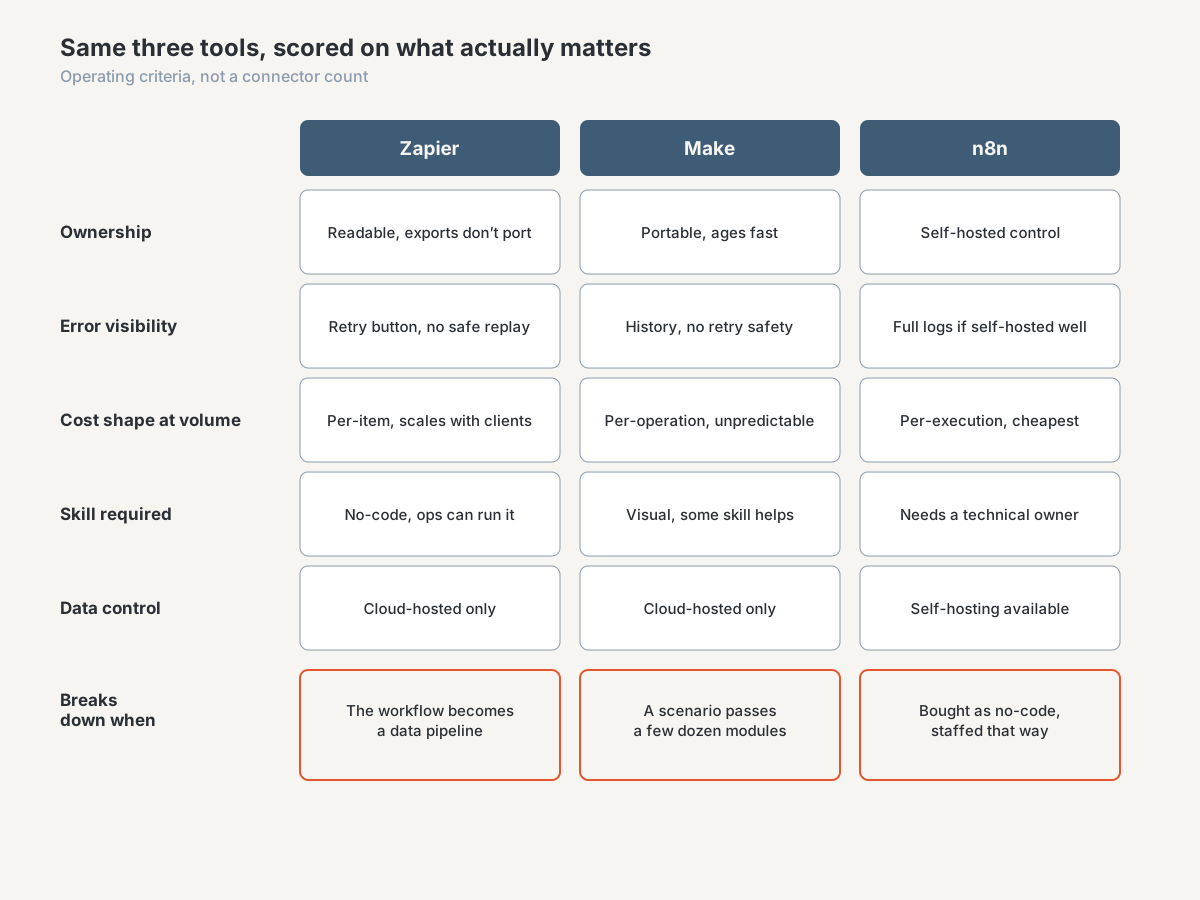
Two structural differences still matter. All three export a workflow definition, and none of those exports import into either of the others, so changing your mind later costs you the build again. And self-hosting n8n puts the definitions, execution history, and credentials in a database you control rather than with a vendor who decides what export you get.
The practical test: if the person who built your automation left tomorrow, could a competent replacement reconstruct intent from what's on screen?
2. Error handling: what happens when a run fails silently at 2am?
This is where agency automation dies, and it stays invisible until it costs you. Three questions, asked of any candidate tool and of every workflow you already run.
Does a failure reach a human in a channel someone reads? Not an email alert to whoever set up the account. A message in the operations channel, with the client name in it.
Can you see the data that failed and replay it? A run history showing the input payload is the difference between a ten-minute fix and a day of guessing. All three keep some, but how long and at what plan level varies, so check rather than assume.
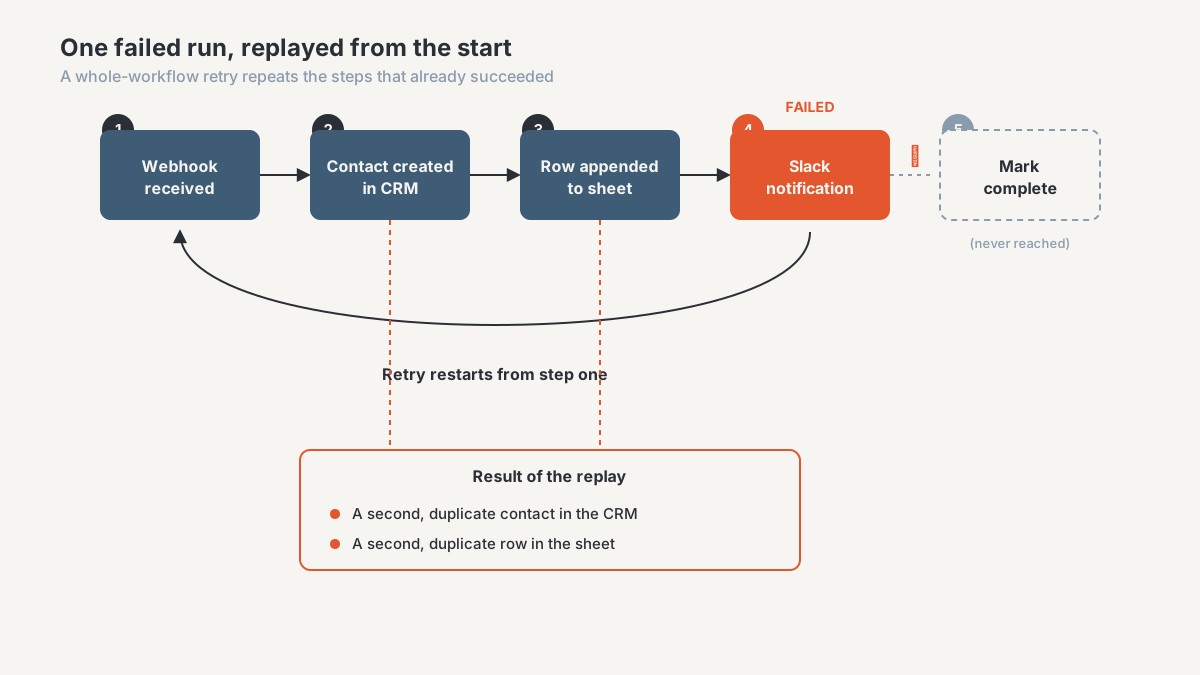
What does a partial failure leave behind? This is the one that bites. A workflow takes a webhook, creates a contact, updates a sheet, then fails on the Slack step. If your retry restarts from the beginning, you now have two contacts and a duplicated row. Every platform gives you the retry button. None of them make your workflow safe to press it. That's the same discipline that keeps duplicate records out of a CRM in the first place, which I wrote about in cleaning the CRM before adding AI.
3. Cost model: how does the bill behave at multi-client volume?
Ignore the sticker price on the entry plan. The billing shape decides which designs are cheap and which quietly become your largest software line item, and the three bill on different units. One counts tasks, roughly each step that acts on each item. One counts operations, where a module firing once per item in a loop counts once per item. One counts executions, where a run is a run regardless of the steps or rows inside it.
A workflow firing a handful of steps per lead is cheap under any of them. A workflow pulling hundreds of rows nightly is cheap under per-execution billing and expensive under per-item billing. Filters save less than you'd expect, because under some models the step that discards an item counted it first.
Then multiply by clients. The workflow you built for one gets cloned for thirty. Per-item billing scales with your book; per-execution billing scales with your schedule. Agencies get caught because the pilot was cheap, so run the arithmetic on your target client count rather than the two you're testing with. And self-hosting doesn't remove this problem, it moves it onto a server, backups, and the hours of whoever keeps them running.
4. Skills: who on the team maintains this?
Answer honestly, because this overrides most of the other criteria. If your ops coordinator is the person adjusting workflows when a client changes their intake form, you need something they can read alone. Connector-heavy, visual, forgiving. If that person has to open a ticket with you for every change, you haven't automated the work, you've moved it.
With someone technical on staff the calculus flips. Code steps and direct API calls stop being a barrier and become the reason the tool is worth using, because a transformation that eats a dozen modules on a canvas takes a few lines in a function. Watch the drift, though: a no-code workflow with six code steps inside it is a codebase with no repository, no review, and no tests, wearing a canvas as a disguise.
So the question for an owner is which statement is true. Nobody here writes code and nobody will, or somebody does and will still be here next year. Answering that aspirationally is expensive.
5. Data control: where does client data transit?
For most agency automation this is a non-issue. Lead names and email addresses moving between a form, a CRM, and a spreadsheet rarely attract contractual scrutiny. It matters when a client in healthcare, finance, or law has compliance obligations that flow down to you, or when a contract names approved subprocessors and requires notice before you add one.
Cloud-hosted automation means client data passes through the vendor's infrastructure and sits in run history for some retention period. That's normal, and it's a fact you may have to disclose. Self-hosting changes the answer, and n8n is the one of the three designed for it. Do it for the control rather than the savings.
What does each tool get wrong?
Every platform has a shape it fights against, and each of these is a mismatch between the tool's shape and the operation's.
Zapier breaks down when a workflow turns into a data pipeline. Its strength is breadth and readability: a non-technical operations person can genuinely maintain what they build, which counts for more than comparison tables admit. Trouble starts with the nightly sync over hundreds of records, where per-item billing turns a reporting job into a line item you have to defend and the looping constructs feel bolted onto a tool designed for straight lines.
Make breaks down on readability once a scenario gets big. The canvas handles branching and arrays well, including the shaping Zapier makes awkward. Then a scenario reaches a few dozen modules across four routes and becomes a diagram only its author can parse. Operation consumption is also hard to predict, so the cost estimate you gave a client stays a guess until the first full month runs.
n8n breaks down when it's bought as no-code and staffed that way. It's the most capable of the three at the technical end, and at volume it can be much cheaper to run. It expects someone who thinks in data structures and HTTP, plus someone who owns uptime, backups, and upgrades if you host it. Community-contributed nodes vary in quality. With no technical owner, it works beautifully until the day it doesn't.
Which tool fits which agency?
Three illustrative composites, not descriptions of specific clients.
The small full-service agency
Six people, a dozen retainer clients, no engineer and no plans for one. Automation means lead routing, notifications, onboarding tasks, and form submissions into the CRM. Volume per workflow is low, and the person changing these workflows is an account manager who learned the tool from a help doc.
Zapier. The cost model isn't efficient at this shape and it doesn't matter, because readability is worth more here. Spend the saved effort on naming conventions and a failure channel.
The reporting-heavy performance agency
Twenty people, thirty-plus clients, and most of the load runs nightly: pull yesterday's data per client, transform it, refresh a reporting layer, alert on anomalies. Loops over rows are the core of the work. One person is technical enough to write expressions and read an API doc.
Make if that person is part-time on this, n8n if they're dependable and interested. Per-item billing is the wrong shape for this workload and gets worse with every client you add. At this profile the reporting architecture matters more than the automation tool anyway, and the two choices interact. I worked through that one in Excel, Power BI, or a warehouse.
The agency with a productized service
The workflow is the product. Clients are on an SLA, there's a technical owner on staff, and at least one contract has opinions about where data gets processed. A failure turns into a refund conversation.
n8n, self-hosted, with monitoring on the host as well as the workflows. Then a serious look at whether the load-bearing parts belong on a connector tool.
When is none of the three the right answer?
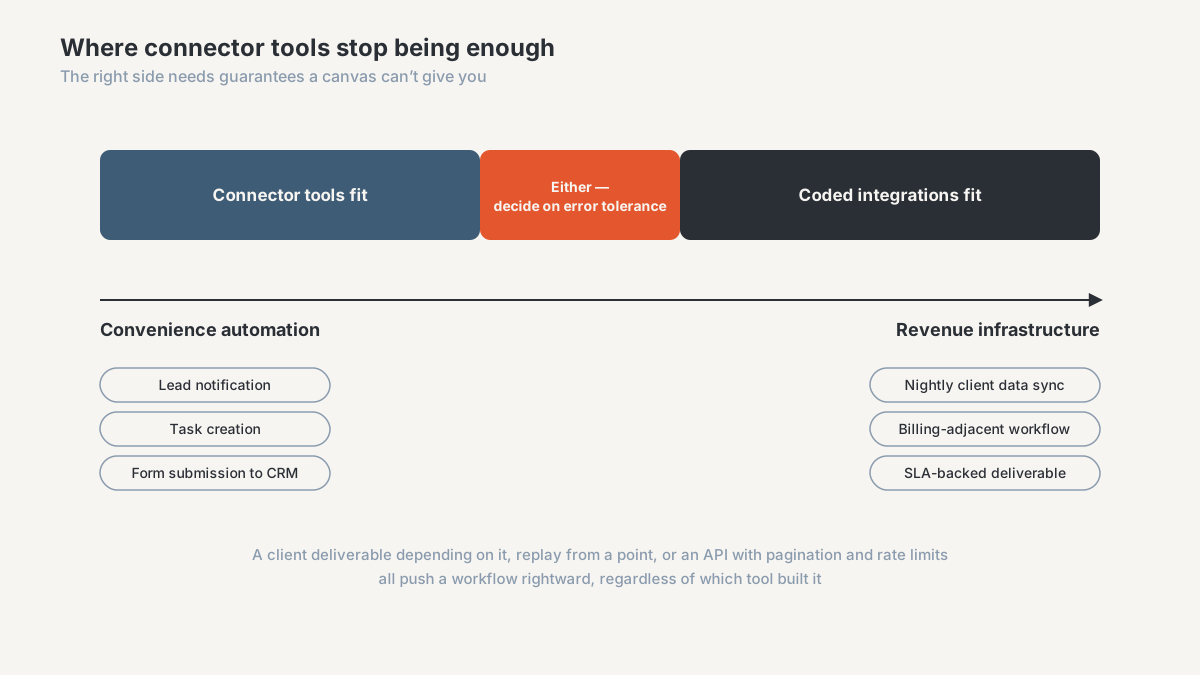
When the workflow is revenue infrastructure rather than convenience.
The signals are consistent. A client deliverable depends on it running. It carries enough conditional logic that the canvas has become a flowchart nobody reads. It needs replaying from a specific point, with a record of what ran and what it wrote. It hits an API where the hard parts are pagination, rate limits, sync windows, and schema changes, which is where a connector gives you the least control.
At that point a small coded integration on a scheduler beats all three: version control, tests, real logs, error handling you designed, no per-item bill. The maintenance burden is different rather than absent, since it needs somewhere to run and someone to read it.
This is the connector-versus-API decision, and it has the same shape as most technology decisions worth making. Work out what the workflow has to guarantee, then pick the thing that guarantees it. The pipeline in exporting GoHighLevel data to Supabase is coded for that reason: it needed durable history, reliable incremental pulls, and to still be correct a year later. The GHL to Google Sheets workflow sits at the other end of the spectrum, where a lighter approach was right.
Agencies usually end up with a mix, which is healthy rather than a failure of standardization. Connector tooling for the wide, shallow, changeable work. Code for the few workflows that have to be right. Running the second category on tooling chosen for the first is what the Monday morning at the top of this article usually turns out to be.
Frequently asked questions
Is n8n cheaper than Zapier for an agency?
Per unit of work, usually, and especially self-hosted. Overall, it depends on what you're not counting: a server, backups, upgrades, and the hours of whoever handles them. With low volume and no technical staff, the subscription wins once you price the time.
Can I migrate my Zaps to Make or n8n?
Not by importing them. Each tool exports its own format and none of them read each other's, so migration means rebuilding and retesting every workflow. Budget it properly. A rebuild is at least a good moment to delete what nobody has needed in a year.
Which one is best for GoHighLevel automation?
All three work with GoHighLevel through its API and webhooks, so the connector question doesn't decide it. What you're doing with the data does. Moving records and triggering actions suits any of them. Building reporting history is a different job, because the CRM overwrites state instead of recording changes, which I covered in what GoHighLevel overwrites.
Do I need a developer to run n8n?
To use the interface, no. To own it in production, effectively yes: someone has to be comfortable with API documentation and data structures, and if you self-host, with patching and backups. Skip that and you're fine for months, then hit a failure nobody on staff can diagnose.
What breaks first when an agency scales automation?
Visibility, well before capacity. The workflows keep running. What stops working is anyone's ability to tell whether they're running. Clients find failures before you do, and each new account adds another clone that has drifted from the original. Fix that with an inventory and a failure channel before stacking more automation on top.
Get your workflows reviewed before you switch tools
If you're weighing Make, Zapier, or n8n right now, the useful first step isn't a trial account. It's knowing which workflows are load-bearing, where they fail without telling you, and what your automation costs per client.
That's part of what the agency CRM and reporting diagnostic covers: a paid, bounded engagement that maps your workflows and reporting, names the failure points, and gives you a recommendation with its real running cost. Sometimes that means switching tools. Fairly often it means keeping the tool and fixing the error handling and ownership around it, which costs a great deal less.
Book a workflow and reporting diagnostic, or see how I work with performance-marketing agencies. Heavier integration work sits under data solutions.
About the author. I'm Ahmed Abdelkhalek, a Data Automation and Reporting Consultant and the founder of ChromiumData, a founder-led consultancy. I work directly with marketing agencies and operations teams on connected workflows and reporting that stay correct after launch, which mostly means the parts nobody demos: retries, duplicate handling, failure alerting, and knowing what a workflow cost last month. AWS Certified Solutions Architect (Associate) and Microsoft PL-300.