A client asks a reasonable question on a quarterly call. How many deals were sitting in Proposal at the end of June, and how many of those closed?
You open the pipeline. It shows you today. Those deals have moved on, been marked lost, or been relabelled by whoever reorganised the stages in July. There is no version of that board dated 30 June, because GoHighLevel never wrote one.
The cause is structural. GoHighLevel stores current state, not state transitions. It is an excellent record of where every deal sits right now and a poor record of how it got there, and most agencies find this out the first time a report has to be reproduced rather than run. The awkward part is that the fix has to start before you need the data.
What does GoHighLevel store when an opportunity changes stage?
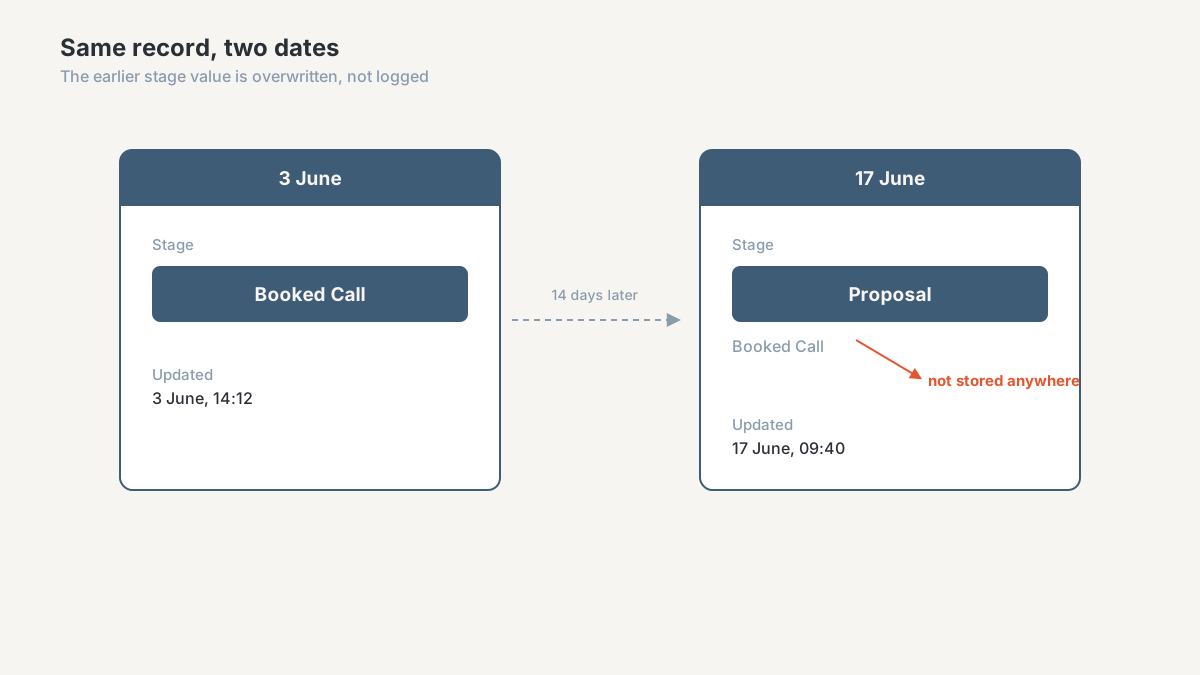
An opportunity is a row. It carries a contact, a pipeline, a value, an owner, a status, and a stage. When somebody drags that card from Booked Call to Proposal, the stage field is replaced with the new value and the updated timestamp moves. The previous stage is not written anywhere you can query.
Nothing errors, and nothing looks wrong. The board is correct as of this second, and the state it replaced is gone.
A reporting system would record the same event differently: a new row saying opportunity 4471 moved from Booked Call to Proposal at 14:12 on 3 June, with earlier rows untouched. One row per move, so the sequence survives. That is the shape my own GoHighLevel to Supabase export writes into a companion table, because there was nothing to copy from the platform.
Two smaller behaviours make it worse.
Stages are configuration, not data. Rename "Discovery" to "Qualified" and every deal that passed through it now reports under a label that did not exist at the time. Delete a stage and the deals that lived in it lose their only marker. Your reporting dimensions are editable, which means your history is editable too.
Deals also move backwards. A deal marked Won, then reversed, then reworked leaves the same single stage field as a deal that went straight through. Those are two different stories, and GoHighLevel cannot tell them apart.
Which reports does this quietly invalidate?
Not the ones you look at every day, which is why this goes unnoticed for years. Anything counting what is true now still works: open pipeline value, deals per stage today, leads created this month, revenue on won deals. If that is the whole of your client reporting, you can stop reading and spend the afternoon on something else.
Four families of report do not work, and three of them are the ones agencies sell.
Stage-to-stage conversion is the first. What percentage of deals that reached Proposal became Won? That needs the count of deals that ever entered Proposal, and GoHighLevel only knows how many are in Proposal now. Every deal that passed through and moved on is missing from the numerator and the denominator both. So agencies substitute "won this month divided by leads created this month", which compares two different groups of people and produces a rate that swings for reasons nobody can explain.
Stage velocity is the second. Average days between Booked Call and Proposal is probably the most useful diagnostic an agency can hand a client, because it names where deals rot instead of saying the pipeline is slow. It needs two timestamps per transition. You have one, and it belongs to the most recent edit of any field on the record, including someone fixing a typo in the deal name.
Cohorts are the third. Take everyone who entered the pipeline in March and follow them forward. That is how you tell whether a lead source produces deals that close or deals that stall, and how you prove an April change worked. Both need the entry date and the path afterwards, and neither survives.
Fourth, and the one that turns into an argument, is reproducing a past state. "What did the pipeline look like on 1 July?" comes up when a client disputes a report you sent, when a bonus is being calculated, or when somebody wants to know whether last quarter's forecast was any good. A report you ran in June cannot be re-run in August and produce the same output. It was a picture of a moment, and it will not survive being checked.
How does an agency notice it's missing history?
Rarely as "we have no history". Usually as one of these.
Numbers change retroactively. You send a report on the 5th. The client asks about it on the 20th, you open the same dashboard over the same date range, and the figure is different. Nobody edited anything. Deals moved, and the report is applying current state to a past window. I covered the neighbouring problem, GoHighLevel disagreeing with GA4 and the ad platforms, in why your numbers don't match. This one is worse: GoHighLevel disagreeing with itself.
Someone on the team keeps a spreadsheet. There is almost always a tab where an account manager pastes the pipeline every Friday. That is an accidental snapshot system, and it exists because the platform keeps no history. It is usually the only place your history lives, maintained by one person, with gaps for every week they were on holiday.
Nobody can answer "why did this change". A client asks why the pipeline dropped, and answering honestly means knowing what left it and when, so investigation turns into opening individual deals and reading notes. When a routine question takes half a day, you have a data problem being paid for in labour.
Reports get rebuilt rather than refreshed. If producing last month's client report involves reconstructing anything, that reconstruction is a person doing the job of the missing history table.
Six questions that tell you where you stand
Run these against your own account. They take under an hour and the answers are not ambiguous.
- Can you produce, from the platform alone, how many opportunities entered a named stage in a named past month? Not sat in it. Entered it.
- Can you produce the average days deals spent in that stage, counting deals that have since left it?
- Can you re-run a report you sent a client three months ago and get the same figures back?
- If somebody renamed or deleted a stage last year, can you still report on the period before the change?
- Where does your longest-running record of pipeline state live? If it is a spreadsheet, who maintains it and what happens when they leave?
- Is anything writing stage changes to a store outside GoHighLevel? Be strict. A Zapier task that fires an email is not a record.
Any single "no" is survivable. Write the answers down anyway, because each one only becomes fixable from the day capture starts. History nobody captured cannot be recovered later, by me or by anyone else, which is why I push this ahead of dashboard work whenever I find it missing.
How do you capture GoHighLevel stage history?
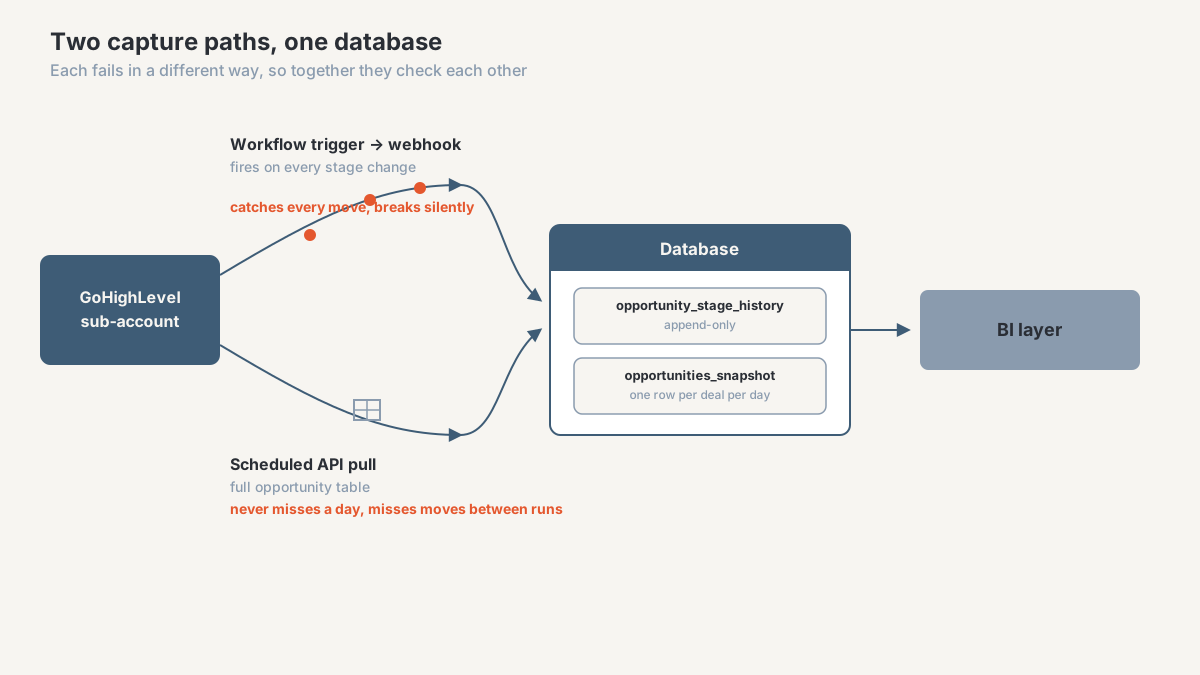
Two patterns, solving different halves of the problem. Plenty of agencies run one. The setups I trust run both.
Pattern 1: a webhook-driven event log
GoHighLevel workflows can trigger on an opportunity changing stage and send a webhook to an endpoint you control. That endpoint writes one row: opportunity ID, contact ID, stage moved from, stage moved to, timestamp. Append only, so nothing ever updates a row.
You get the real sequence at the resolution things happened, including the deal that moved twice in an afternoon. It is the only pattern that produces true velocity, because it holds both ends of every transition.
It also fails in a specific way. Webhooks are fire-and-forget, so if your endpoint is down for two hours those events are gone and nothing tells you. Someone editing a workflow can detach the trigger. Bulk imports and API-driven changes may not fire the same trigger a manual drag does. The one that catches people is sub-account coverage: the trigger has to exist in each one, so onboarding a client means remembering to install it, and the day you forget is the day that client's history starts late.
Build it with a delivery log and an alert on silence. A pipeline that has received nothing for 36 hours is either a quiet week or a broken integration, and you want to know which. The full schema, dedup rule, and reconciliation query for this pattern are worked through in building a GoHighLevel stage history you can defend in a client meeting.
Pattern 2: scheduled snapshot export
The other approach ignores events. On a schedule, pull the full opportunity table through the API and write it to a database with a snapshot date on every row. Tomorrow the same deals get written again under tomorrow's date.
Nothing here breaks silently. A failed run leaves a missing date, which is a far friendlier failure than an event that never arrived. It also captures changes that fire no event at all: value edits, owner changes, custom field updates, deals deleted between runs.
The trade-off is resolution. A daily snapshot cannot see a deal that moved from Booked Call to Proposal to Won on a Tuesday. You get the start and end state and lose the middle, so velocity becomes approximate and any stage a deal passed through quickly vanishes from your conversion counts. Storage costs something too, though at agency volumes that is rarely the binding constraint.
The mechanics are the ones in the Supabase export build: a read-only private integration for API access, a scheduled function that pages through results, and a raw landing table nobody edits by hand. If your volumes are small and your team lives in spreadsheets, an append-only sheet does the same job less durably, which is the pattern behind the GHL to Google Sheets workflow.
Pattern 3: both, which is what I usually build
The two patterns fail in opposite directions, so they check each other. The event log gives you resolution, the snapshot gives you a guarantee. If a deal's stage on Tuesday's snapshot does not match what the event log says it should be, the log missed something and you know that on Tuesday rather than during a client dispute in March.
People skip that reconciliation, and it is the part that makes the data defensible. A history table nobody validates is a history table you will eventually stop trusting.
Whether it is worth building depends on what you sell. If reporting is a courtesy inside a retainer, a weekly snapshot into a spreadsheet is proportionate. If reporting accuracy is a deliverable a client pays for, the durable version belongs in a database you control, which is the data solutions end of what I do. When native reporting stops being enough at all sits in GoHighLevel reporting limitations.
What can you answer once the history exists?
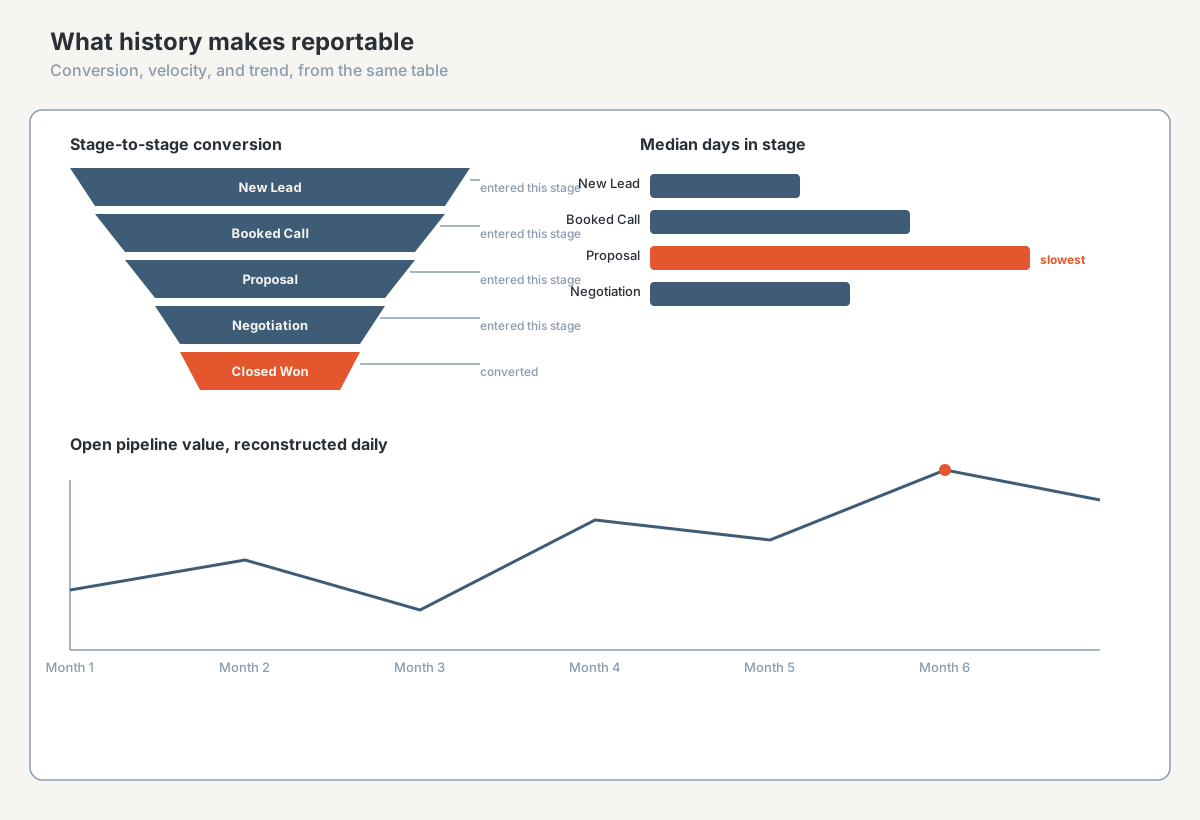
Stage-to-stage conversion with a denominator made of deals that genuinely entered the stage. Median days in stage rather than the average, which matters because pipeline distributions have long tails and the mean flatters you. The point where deals from a given source stall, which turns a lead-quality argument into something measurable. Pipeline as it stood on any past date, so a report you sent is one you can still defend six months later. Forecast accuracy, from comparing what each stage predicted against what closed.
One caution. History makes bad definitions visible rather than fixing them. If "Qualified" means something different to each account manager, a conversion report built on a year of history will say so in a way nobody can ignore. Good outcome, but it arrives as an argument about definitions, so expect it and do the unglamorous stage-definition work first. I've written about where definitions drift and what it costs in Your GHL Reporting Is Lying to You.
Frequently asked questions
Does GoHighLevel keep opportunity stage history?
Not in a form you can report on. The record carries the stage it is in now, and moving a deal replaces that value. Some activity may be visible on individual records in the interface, but that is not a queryable table of transitions and will not produce a conversion rate or a time-in-stage figure. Check your own account first, since platform behaviour changes.
How do I track how long deals spend in each pipeline stage?
You need both ends of each transition, which means capturing stage changes as events from now on. A workflow trigger firing a webhook into a database you control is the usual mechanism, one appended row per move. After a few weeks of events, time in stage is a subtraction. It cannot be computed retroactively for moves that happened before capture started.
Can I export stage change history from GoHighLevel?
No, because the platform does not hold it. An opportunity export gives you the current state of each deal, which is a snapshot rather than a history. Exporting on a schedule and stamping each pull with its date builds history going forward, which is the practical route for most agencies.
Why do my GoHighLevel reports change after I've already sent them?
Usually because the report applies current state to a past date range. Deals moved after you sent it, and the report re-reads their new stages. Contact merges and stage renames do the same, and timezone settings can shift records across day boundaries. The first cause is the platform working as designed, so the only defence is keeping your own copy of what you reported.
Is it worth building this if I only have a few clients?
Often not. If you report lead counts and won revenue monthly and nobody asks about velocity or cohorts, native reporting is fine and a second system is a cost with no return. What tips it is selling a metric that needs history, or a client disputing a number you cannot reproduce. Since history only accrues from the day capture starts, a weekly snapshot into a spreadsheet is cheap insurance meanwhile.
Find out what history you're missing
This one has a clock on it. Every week spent deciding is a week of pipeline history nobody is writing down, and no build later gets it back.
The agency CRM and reporting diagnostic is a paid, bounded first engagement that answers this for your account: which reports you currently send cannot be reproduced, what history you already have by accident, what capture pattern fits your sub-account count and your team, and whether the honest answer is a weekly snapshot rather than a build. You get the findings whether or not the work continues with me.
See how I work with performance-marketing agencies on CRM and reporting data, or start the conversation.
About the author. Ahmed Abdelkhalek is a Data Automation and Reporting Consultant and the founder of ChromiumData, a founder-led consultancy. He works directly with marketing agencies and operations teams on CRM data quality, reporting automation, and keeping numbers consistent after launch. More at Ahmed Abdelkhalek.