Open a GoHighLevel sub-account and you can read funnel conversion, pipeline value, call volume, appointment show rate, and whatever ad spend you've connected. Then a client asks what their store did last month, or how many people landed on the WordPress site sitting in front of the funnel, and the dashboard has nothing to say.
That is not a setting you missed. GoHighLevel reports on the objects it owns. A Shopify checkout, a WooCommerce order, and a WordPress pageview don't create GoHighLevel objects, so they never appear in GoHighLevel reporting. This has been raised repeatedly on GoHighLevel's own public ideas board, which is the clearest evidence available that it's a platform boundary rather than something you configured wrong.
Below I name what falls outside that boundary, then walk through the three architectures I use to close it. Which one fits depends mostly on how many stores you report on and how often the answer has to be right.
What exactly can't GoHighLevel see?
Anything happening on infrastructure GoHighLevel doesn't host, and any transaction that doesn't pass through a GoHighLevel payment object.
That boundary is easy to blur, because you can get data from a store into GoHighLevel. Marketplace apps, Zapier, and webhooks will create or update a contact when someone buys on Shopify. Plenty of agencies have that running and assume the reporting problem is handled. It isn't. A contact record with a tag on it is a marketing trigger, not a revenue record.
Shopify and WooCommerce order/revenue data
What a store knows about an order is a rich object: order ID, line items, SKUs, quantities, discount codes, shipping, tax, refunds, fulfilment status, and whether this was the customer's first purchase or their fourth.
What arrives in GoHighLevel through a typical integration is a contact, an email address, maybe a tag, maybe one custom field holding an order total. You can't report average order value from that. You can't separate new-customer revenue from returning-customer revenue. You can't net off refunds, because a refund three weeks later rarely comes back through the same automation that created the contact. And if the same person orders twice, you now have a contact whose custom field has been overwritten and a purchase history that exists nowhere in GoHighLevel.
GoHighLevel does report revenue. It reports revenue that moved through its own order forms and payment products. Money that moved through a Shopify or WooCommerce checkout is invisible to it by design. Whether a given marketplace app claims to bridge that is worth checking against the current marketplace before you promise anything, because the integration ecosystem changes constantly.
WordPress and general website traffic
The second half of the gap is traffic. GoHighLevel tracks pages it serves: funnels, forms, and websites built inside the platform. A WordPress site on separate hosting is, from GoHighLevel's point of view, an external domain that occasionally sends a form submission.
So the sessions, sources, landing pages, and behaviour on the site doing most of the client's organic work all live in GA4, the lead and pipeline outcomes live in GoHighLevel, and nothing joins them. You can install a tracking script and capture UTMs on submitted forms, and you should. But UTM capture on a form tells you the source of the people who converted. It says nothing about the ones who didn't, which is the population you need if you want to explain a bad month rather than just report it.
Same class of problem I ran into in six questions GA4 wouldn't answer on its own: the platform holds the data, but not in a shape that answers the question the client is actually asking.
Why does this matter for client reporting?
Because the client doesn't experience their business as separate platforms, and shouldn't have to.
The pain language on GoHighLevel's ideas board and in review commentary puts it plainly: the gap "creates a gap in reporting because they can't show clients their website traffic … alongside their funnels, CRM, and ad results." That sentence is doing quiet work. The complaint isn't that the numbers are unavailable. Shopify has a decent analytics section and GA4 will tell you about traffic. The complaint is that they can't be shown alongside each other.
In practice that plays out one of three ways. Someone opens four tabs at month end, retypes numbers into a slide, and hopes nobody asks how ad spend in one system relates to revenue in another. The multi-client version of this appears in the same commentary as "hours of manual work each month," and it scales linearly with your client count.
Or the report only shows what GoHighLevel can see, and the client's own Shopify dashboard quietly disagrees with it. Once a client notices your numbers and their numbers differ, the conversation stops being about performance and becomes one about whether you can be trusted. That is much harder to recover from.
Or nobody reports the store at all, so the agency gets judged on lead volume while the client judges themselves on revenue. Those two lines diverge more often than anyone likes.
Is this a known limitation, or just a configuration problem?
It's a known limitation, and the evidence is public.
Requests to make GoHighLevel see external store and website data show up repeatedly on its own ideas board. That matters twice over. You aren't misconfiguring anything, because people who use the platform daily went to the trouble of filing the request, which nobody does about a setting they can find. And the fix isn't coming on a schedule you control. An idea on a public board describes the current state; it isn't a roadmap commitment.
Worth separating this from GoHighLevel's other reporting complaints, because they have different fixes. "Custom reports are not truly custom" and raw exports being "not ready for direct use" are limits on how GoHighLevel presents data it already holds. Those are shaping problems, and I cover them in when GoHighLevel's native reporting stops being enough. The e-commerce and website gap is different in kind: the data was never in the system. No amount of report configuration will surface a row that doesn't exist.
Which is oddly good news. A missing-data problem has a clean solution shape. Bring the data somewhere the CRM data also lives, give it a shared key, and report from there. That's an architecture decision, and there are three worth considering.
How do you unify GoHighLevel with Shopify/WooCommerce data?
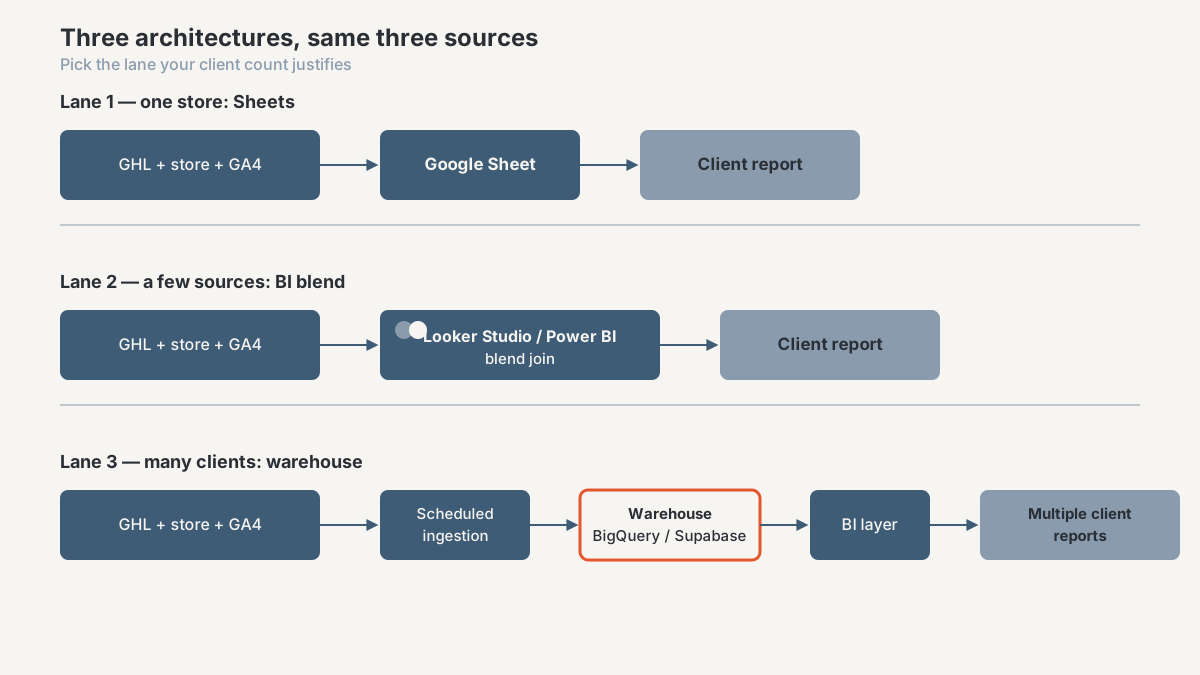
Before the tool question, answer three others: how many stores you need this for, how often the report has to be accurate, and who maintains it while you're on holiday. Then pick the lightest architecture that survives all three.
Sheets-based consolidation
One store, one client, a monthly or weekly report. Land the GoHighLevel export, the store's order export, and a GA4 traffic pull into separate tabs of one Google Sheet, then build the reporting tab on top with formulas or Apps Script.
I use this more than tooling snobbery would suggest, because it's honest about its scope and a client can look inside it. The store half is a solved problem: the interactive Shopify analytics dashboard in my portfolio is a four-page reporting app running on Sheets, Apps Script, and JavaScript. The GoHighLevel half looks like the GHL to Google Sheets workflow case, which pulls appointments, pipeline stages, revenue, and ad spend inputs into a reporting sheet.
Where it breaks: manual exports get skipped, someone edits a formula, row counts grow past the point where the sheet recalculates comfortably, and history disappears because this month's refresh overwrites last month's numbers unless you deliberately snapshot them. Good for one or two clients, bad for fifteen. To last, it needs the same treatment as any production system: scheduled pulls instead of manual ones, a raw layer nobody edits, and a documented refresh. That's what separates a sheet from a spreadsheet automation build.
BI-layer blending (Looker Studio / Power BI)
The next step up leaves the data where it lives and joins it at the presentation layer. Looker Studio connects to GA4 natively, to Sheets, and to Shopify or GoHighLevel through a paid connector. Power BI does the same through its own connectors or an API call. You blend the sources on a shared field and build one report surface over the top.
This is right when you have a handful of sources, a client who wants a live link rather than a PDF, and a join key that's genuinely simple, usually date or campaign or customer email.
The trade-off people underestimate is that blending is not joining. Looker Studio blends default to left outer joins evaluated at query time (other join operators exist, and each changes which rows survive), and they carry real limits on how many sources you can combine and how aggregation behaves once you blend pre-aggregated data. Get the join key wrong and you get duplicated revenue rows that look perfectly plausible. You're also dependent on a connector's refresh schedule and its pricing, and connectors change both. If you're weighing the two tools, my longer comparison of Power BI and Looker covers the modelling and governance differences that matter here.
Set up properly, this tier is where most single-brand clients should land. It's the core of what I build under dashboards and analytics.
Warehouse-based unification for multi-client agencies
Once you're doing this across many client stores, blending stops paying for itself. Every new client means another set of connectors, another set of blends, and another thing to fix when a schema changes.
The pattern that scales is boring. Scheduled jobs pull GoHighLevel, the store platform, GA4, and the ad platforms into a warehouse (BigQuery, Supabase, or Postgres) on a defined cadence. You model the data once with a clear customer key and a clear date grain, and every client report reads from that model. A new client adds rows, not architecture.
This also fixes something neither of the other tiers can. GoHighLevel overwrites opportunity state as contacts move through stages, so it can tell you where a deal is but not reliably where it was. I've documented that failure mode in three places GHL reporting misleads you and the mechanics of capturing stage-change history durably in exporting GoHighLevel data to Supabase. A warehouse gives you period snapshots, refund-adjusted revenue, and cohort views neither Shopify nor GoHighLevel produces alone.
The honest cost: this is a real build with running costs and someone has to own it. Don't buy it for two clients. Buy it when the manual reporting hours across your book exceed what the pipeline costs to run. That's the work I scope under data solutions and integration.
What should a unified report actually show?
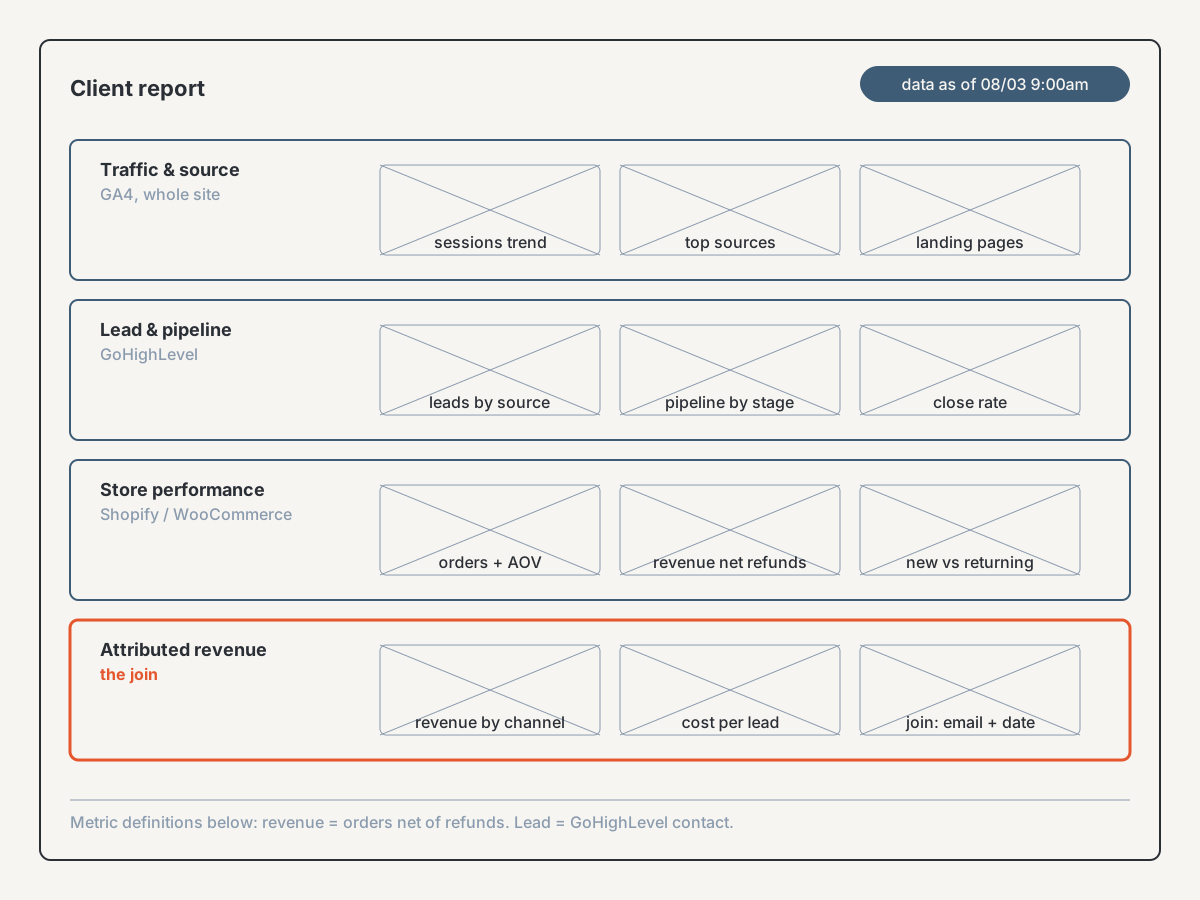
Whichever architecture you pick, the goal isn't more charts. It's one page a client reads top to bottom without changing systems.
I'd argue for four bands. Traffic and source, from GA4, covering the whole site rather than only the funnel pages. Lead and pipeline, from GoHighLevel: leads created, appointments, opportunities by stage, close rate. Store performance, from Shopify or WooCommerce: orders, revenue net of refunds, average order value, and the new versus returning customer split. Then the join, which is the only band a client can't already get somewhere else: revenue attributed to the channels and campaigns above it, on a shared date grain and a shared customer key.
That last band justifies the whole exercise. Everything above it is available in four browser tabs. Only the join answers the question that gets a retainer renewed, which is whether the marketing produced money.
Two rules I'd hold to. Put the date grain and refresh time on the report itself, because a client who doesn't know how fresh a number is will assume it's live and catch you out later. And define each metric once, in writing, next to the report. Store revenue and CRM revenue never match exactly, since they treat timing, tax, shipping, and refunds differently. A client told why in advance reads that as rigour. A client who finds it alone reads it as an error.
Frequently asked questions
Does GoHighLevel have a native Shopify integration?
Not one that brings order-level data into GoHighLevel reporting. You can connect the two so a Shopify customer becomes a GoHighLevel contact through marketplace apps, Zapier, or webhooks, which is useful for automation. It won't give you orders, line items, refunds, or store revenue inside GoHighLevel dashboards. Check the current marketplace before relying on any specific app, since that ecosystem changes.
Can I pull WooCommerce order data into a GoHighLevel dashboard?
Into the dashboard itself, no. WooCommerce orders have no corresponding object in GoHighLevel to report on. The workable approach runs the other way: sync both WooCommerce and GoHighLevel data into a shared layer, whether a Google Sheet, a BI tool, or a warehouse, and build the client-facing dashboard there.
Why doesn't GoHighLevel show website traffic like GA4 does?
Because it only tracks pages it serves. GoHighLevel measures funnels, forms, and sites built inside the platform. A WordPress site on separate hosting is an external domain to it. GA4 stays the traffic source of truth; the job is joining GA4 to GoHighLevel outcomes, not replacing it.
What's the simplest way to combine store and CRM data for a client report?
For a single client, a Google Sheet with one tab per source and a reporting tab on top gets you a defensible report quickly. Use scheduled pulls rather than manual exports, keep a raw layer nobody edits by hand, and snapshot each period so history survives the next refresh.
Is this workaround different for a single site vs. multiple client stores?
Materially, yes. One store is a Sheets or blended-dashboard problem. Ten stores is a modelling problem, and repeating the single-store approach ten times creates maintenance that grows faster than the revenue it supports. Across a book of clients, build the warehouse layer once instead of ten fragile pipelines.
Map your GoHighLevel and store data gap
If you're reporting on GoHighLevel alongside a Shopify, WooCommerce, or WordPress property and the two never quite line up, the first job isn't building anything. It's mapping what each system holds, where the join key is, and which of the three architectures your client count actually justifies.
That's what the agency CRM and reporting diagnostic does: a paid, bounded engagement producing a data map, the specific failure points in your current reporting, and a recommended architecture with its real cost. You can see how I work with agencies on agency data ops, or start the conversation from the contact page.
About the author. I'm Ahmed Abdelkhalek, a Data Automation and Reporting Consultant and the founder of ChromiumData, a founder-led consultancy. I work directly with marketing agencies and operations teams on the unglamorous part of reporting: getting CRM, store, ad, and web data into one place with definitions that survive a client checking them. Most of what I publish comes out of builds I've shipped, including the GoHighLevel and Shopify work referenced above.