Picture an agency that signs a client on the 3rd. Kickoff on the 9th, which goes well. On the 24th the client emails asking why nothing is live yet, and it takes someone forty minutes to find the answer: an ad account access request went to an address nobody at the client monitors, it expired after a week, and the account manager read the silence as progress.
Nobody did their job badly. Every task got completed. The onboarding still ran three weeks long, because the failure sat where no task list was watching: the seam between two people who each assumed the other was holding it.
That's the pattern I keep finding when agencies ask me to automate onboarding. The tasks are usually fine. The handoffs are where the time goes.
Hence the rule this article is built on. Map the handoffs before you automate anything, because automating an unmapped process doesn't repair it. It makes the same inconsistency happen faster, with fewer people watching.
What is a handoff, and why does it break more often than a task?
A handoff is any moment where work crosses a boundary: person to person, system to system, or company to company. Something has to travel across, and something usually gets left behind.
Tasks have an owner, a definition of done, and someone who notices when they're late. Handoffs often have none of the three. Ask who owns "getting Meta access" and you'll get a name. Ask who owns the state between requesting access and having working access, and you'll get a pause.
Three things go wrong at a boundary. Context gets dropped, because the transport (a Slack message, a CRM note, a remark on a call) doesn't carry what the receiving side needs. Ownership goes ambiguous, because mid-crossing the item belongs to nobody and an unowned item generates no alert. And "done" stays undefined: access was requested, so the box got ticked, and nobody logged in to check.
So I write down four things per handoff: what crosses the boundary, where it stalls, what done actually means, and how much of it a machine can take. That last one has three answers.
Form or workflow. What crosses has a fixed shape and nobody decides anything. Automate these.
Checklist plus human. The shape is fixed, but somebody has to verify, chase, or accept. Automate the reminder, keep the human on the acceptance.
Judgment. What crosses is a decision. Template the format, never the content. Skip that distinction and you get a campaign brief assembled from form fields that nobody believes.
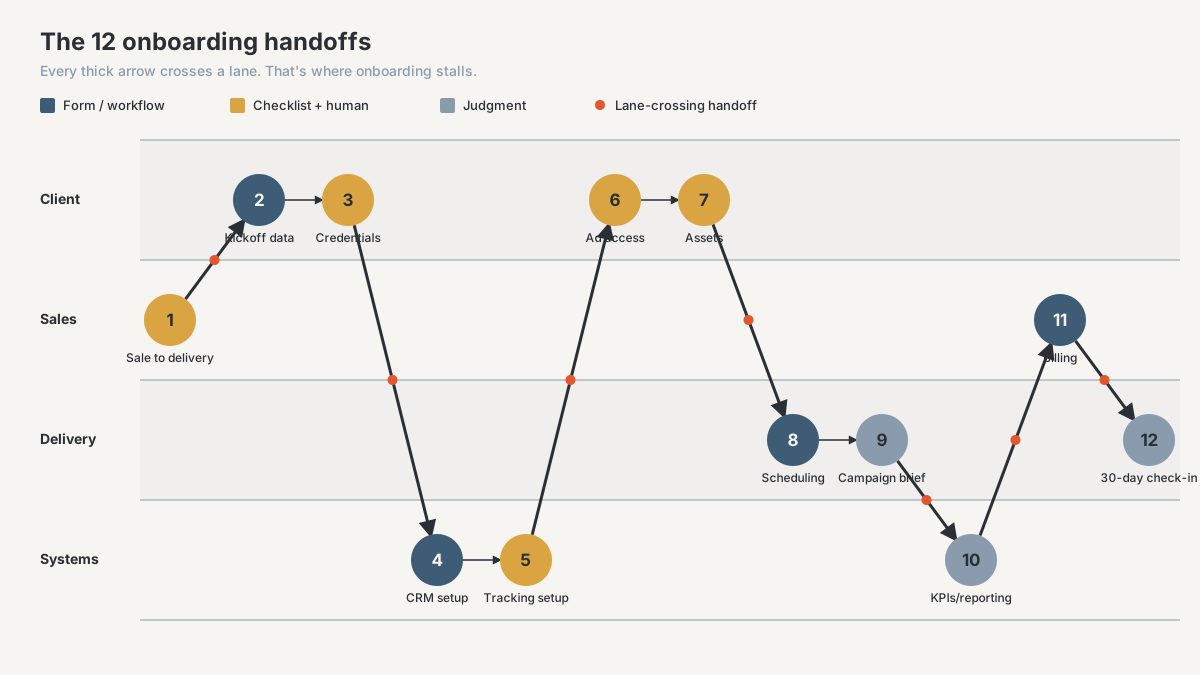
Where does the work leave your sales side?
1. Sale to delivery (internal)
What crosses is everything the person who sold the deal knows and never wrote down. The CRM holds the deal value and the signed scope. It does not hold "I told them we'd look at their old landing pages in month one." Delivery works from the scope document, the client cites the promise, week two turns awkward.
Done: the delivery owner can state the goal, the out-of-scope promises, the exclusions, and the internal risk, in writing, in one record.
Type: checklist plus human. Fire a required handoff form when the deal moves to Won. No field generates "what did you promise them."
2. Client kickoff data collection
Business facts move from client to agency: offers, pricing, service areas, sales process, compliance limits. It stalls on the long single form. The client answers the easy half, hits a question that needs their operations manager, closes the tab, and it sits half done for nine days.
Done: every field answered or marked not applicable, with a named owner and a date against each remaining blank.
Type: form or workflow, with one rule: split it by who can answer, so finance, operations and marketing are each trackable separately.
3. Credential and access collection
Secrets cross: logins, API keys, registrar and DNS control, analytics permissions. It fails three ways. The client emails a password in plain text, which is now your problem too. The client doesn't have the login. Or the person who had it left eighteen months ago.
Done: every named system has verified working access at the permission level you need, held in a shared vault, with an owner on both sides. Verified means somebody logged in.
Type: checklist plus human. The request and reminder loop automate fine. Verification stays manual deliberately, because ticking a box when a request goes out is the failure at the top of this article.
Which handoffs cross into your own systems?
4. CRM and sub-account provisioning
Your delivery standard crosses into an empty instance, and what usually crosses instead is a copy of a copy. Somebody clones the last client's sub-account because it's quicker, inheriting their custom fields, renamed pipeline stages, and two workflows disabled for a reason. Six months on, nothing rolls up across clients.
Done: the new instance matches one documented standard. Named stages, required fields, timezone set to the client's business hours rather than yours, permissions, no residual data.
Type: form or workflow, conditional on maintaining a template rather than a favourite old account. A GoHighLevel snapshot carries configuration — pipelines, custom fields, workflows, funnels, calendars, forms — but not contacts, opportunities, conversations, or third-party integration connections, so a template built from a clean sub-account won't drag a copy's residual client data along with it; a template built from someone's live account will. Holding one standard is the discipline in clean the CRM before you add AI, and why it matters across a book of clients is in multi-location rollup reporting.
5. Tracking and attribution setup
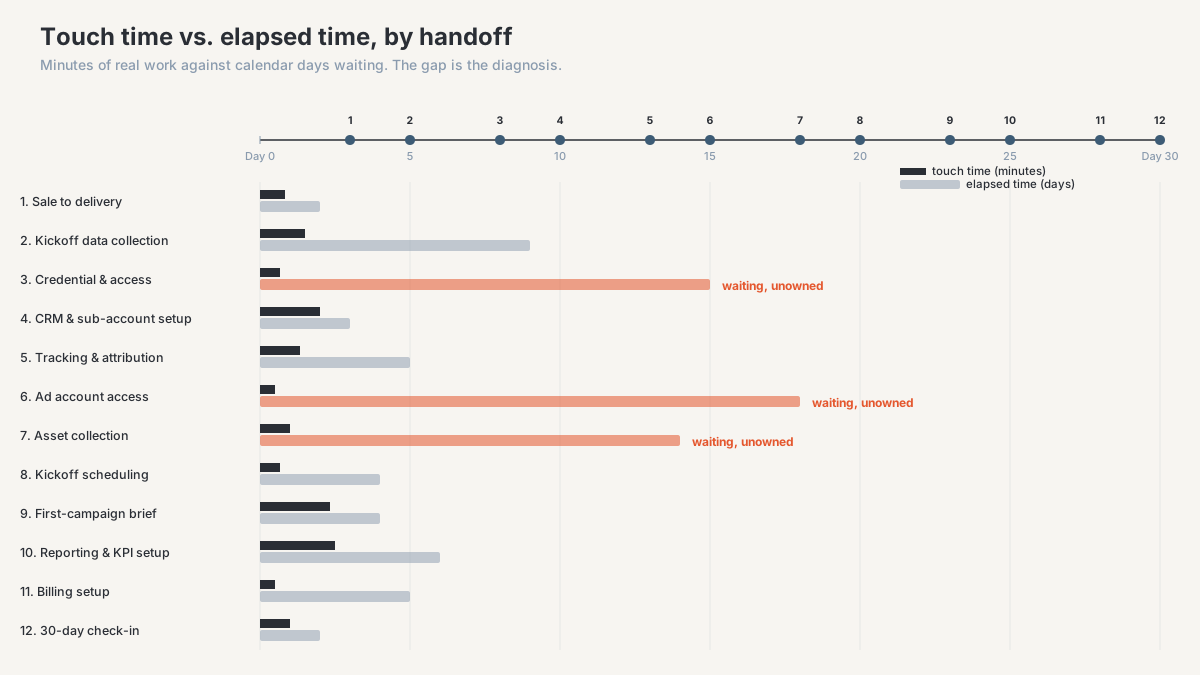
Identity crosses, from an ad click through a landing page into a CRM record. It stalls silently, which makes it the sneakiest item here even though it isn't the widest elapsed-time gap on the map (that's handoffs 3, 6, and 7). The form submits, the contact appears, the automation fires, and the attribution fields are empty. You find out at the first monthly report.
Done: a live test click from every paid source has landed as a contact with source, campaign, and click ID populated. Not a diagram. An actual click, saved as evidence.
Type: checklist plus human. Installation is scriptable. The proof click is manual, per client, per source, and it's the one check I'd keep if I could keep only one. The join keys that make this checkable in the first place are covered in the agency attribution data model.
6. Ad account access
Permission crosses two company boundaries through a platform with its own rules about who can grant what. The request goes to a personal address and expires. The wrong permission level gets granted, so you can see the account but not build in it. The outgoing agency still holds partner access and nobody wants to ask.
Done: you can see spend and build a campaign, the billing source is attached and confirmed, and there's a stated date for removing the previous agency.
Type: checklist plus human, honestly closer to human. Chasing a request, reading a permission level, and untangling an incumbent are not things a workflow does. What automation buys you is visibility: an item that reports its own age, so day eleven can't happen.
Which handoffs depend on the client doing something?
7. Asset collection
Files cross with the rules attached: logos, brand guidelines, photography, testimonials, disclaimers, approved claims. They arrive scattered across a Slack thread, two emails, and a transfer link that expires before anyone downloads it. Or the client sends what they have rather than what you asked for.
Done: a defined folder structure, an item-level checklist, each item marked received and usable. Somebody opened the files.
Type: form or workflow to collect, human to accept. An upload form writing to a fixed destination kills the scatter, but it won't tell you the photography is unusable.
8. Kickoff scheduling
Availability crosses two companies, along with the attendance of people who were never on a sales call. This is the most-automated handoff on the list and still one of the most-missed, because automating it early is the mistake. Your contact picks a slot their technical person can't make, half the questions go unanswered, and you book a second call.
Done: meeting booked, required roles confirmed by name rather than by hope, agenda sent ahead, and handoffs 2 and 3 closed so the call can be about decisions.
Type: form or workflow, gated. The booking link stays shut until its prerequisites are done. A scheduler firing on contract signature guarantees a kickoff call with no inputs.
9. First-campaign brief
Intent crosses. Everything collected becomes a decision about what you'll actually run. It stalls when the brief gets written from the proposal rather than the kickoff, usually by somebody who wasn't on the call. It reads plausibly and encodes what you assumed during the sale instead of what you learned after it.
Done: the brief names the audience, the offer, the primary conversion event, the budget, the launch date, and what a good result looks like at thirty days, approved by the client in writing.
Type: judgment. Template the structure so nothing gets forgotten and leave the thinking alone. A brief auto-assembled from intake fields has no author, and gets treated like it.
Which handoffs decide whether month two goes well?
10. Reporting setup and KPI definitions
Agreement about what the numbers mean crosses from a conversation into a system. It stalls when the report gets built before anyone settles what a lead is. The report ships, the client compares it against their own dashboard, the two disagree, and the conversation stops being about performance and becomes one about whether your numbers can be trusted.
Done: every client-facing metric has a written definition, a named source, and a refresh cadence, and the client has read them and agreed. Then you build.
Type: split. Definitions are judgment and belong to a person, which is the purpose of an agency KPI dictionary. The build automates once they exist, and running the two in the wrong order produces reporting you re-explain every month. Inheriting an account rather than starting one? The reporting audit checklist tells you what you have.
11. Billing setup
Money crosses, finance to finance, usually the one pair of people who have never spoken. The invoice goes to whoever signed instead of whoever pays. A PO number is required and nobody asked. Ad spend responsibility gets assumed rather than agreed. It gets skipped because asking about payment terms feels awkward in a honeymoon week.
Done: invoice recipient, payment method, billing cycle, PO requirement, and ad spend responsibility recorded and confirmed by whoever controls payment, before the first invoice.
Type: form or workflow, straightforward once somebody agrees to ask. The obstacle is social, not technical.
12. The 30-day check-in
The account crosses from onboarding into steady delivery, and it stalls by never being scheduled. Onboarding informally ends when campaigns go live, so every deferred item becomes permanent: fields marked to-be-confirmed, the tracking gap on one source, the asset you agreed to work around.
Done: a scheduled review against the onboarding record where every deferred item is closed or reassigned with a date, and the client confirms the reporting matches expectations.
Type: the trigger automates and should be created on day one, not day thirty. The content is judgment. This is where the onboarding record gets closed rather than abandoned.
Where do you start once the map exists?
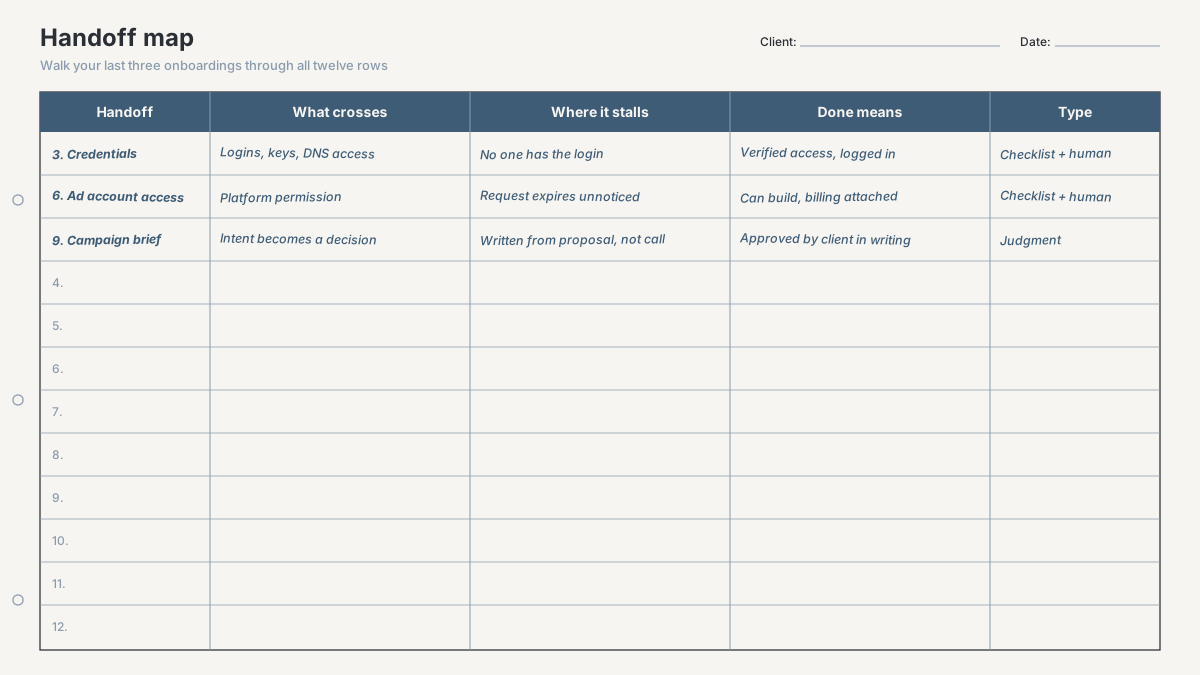
Take your last three onboardings and walk them through these twelve, filling in the worksheet's other four columns each: what crossed, where it stalled, what your team treated as done, and which type it is (the fifth, Handoff, is already pre-printed on the sheet). Then add one more number per row that isn't on the sheet: how many calendar days passed against how many minutes of real work. The gap between elapsed and touch time is the diagnosis. Usually the work is hours and the calendar is weeks.
Then sequence the fixes. Gating handoffs first, even manually: access (3 and 6) blocks nearly everything downstream, so give it an owner and a visible age before you automate a thing. Fixed-shape handoffs next, because they pay back immediately and can't do much damage. Judgment stays with people, so 1, 9, and the definitions half of 10 keep a human author.
And instrument whatever you automate, because every handoff needs a visible state, an owner, and an age. An onboarding you can't observe is one you'll reconstruct by scrolling Slack.
Frequently asked questions
What's the difference between onboarding automation and an onboarding checklist?
A checklist tracks tasks a person completes. Automation moves work across a boundary without a person carrying it. Plenty of agencies that call their onboarding automated have a very good checklist, where every item still waits for someone to notice. The test: if an item can sit untouched for a week with nothing visibly changing, it isn't automated.
How long should agency client onboarding take?
Any benchmark you read is somebody else's scope, so measure your own. Track touch time (minutes of real work across the twelve handoffs) against elapsed time (days from signature to launch). If elapsed runs many times touch, your problem is unowned waiting, and hiring won't fix it.
Should I run onboarding in my CRM, a project tool, or a form builder?
Whichever one your team already opens daily, because a tracker nobody looks at is worse than none. What matters more is that one system holds the state of all twelve handoffs, rather than splitting them across email, Slack, and a project tool with nowhere that says where a client is stuck.
Which parts of client onboarding should never be automated?
Three. The sales-to-delivery handoff, because the valuable part is undocumented context only the seller has. The first-campaign brief, because a document assembled from form fields has no author and gets read that way. And the KPI definitions, which are commitments about what you'll be measured on.
What's the first thing to fix if onboarding is slow?
Give every access request an owner and a visible age. Access gates tracking, campaign build, and reporting, so it sets the floor for everything else, and it's the item most likely to be sitting where each side assumes the other has it.
Scope the build before you build it
If your onboarding burns weeks of calendar for hours of work, the first step isn't buying a tool. It's mapping these twelve handoffs against your last few clients: which boundaries are unowned, which definitions of done are fiction, and which existing automations just move inconsistency around faster.
That's the job of the agency CRM and reporting diagnostic, a paid and bounded first engagement that maps your onboarding and reporting handoffs, names the stall points, and returns a scoped build plan with what each piece costs to build and maintain. You keep the map either way.
Start with a diagnostic, or see how I work with performance-marketing agencies on onboarding, CRM, and reporting operations.
About the author. Ahmed Abdelkhalek is a Data Automation and Reporting Consultant and the founder of ChromiumData, a founder-led consultancy. He works with performance-marketing agencies directly, from diagnosis through delivery, mostly at the unglamorous end: CRM data that won't reconcile, processes that live in three tools and one person's head, automations that stop running a month after launch. He holds the AWS Certified Solutions Architect (Associate) and Microsoft PL-300 certifications.