A client forwards you an email one of their leads received. It is polite, well written, and wrong: it offers a service the client stopped selling in March. So you go looking for why it went out. The automation ran nine days ago, the model call happened, the message sent, and nothing about any of it was kept. You have the email in front of you and no way to reconstruct what the model was looking at when it wrote it.
The honest answer to your client is a shrug, which is an expensive thing to hand someone paying you to run their marketing operations.
Nothing exotic happened here. The workflow was built the way these usually get built: someone wired a trigger to a model to an action, watched it produce a few good outputs in testing, and switched it on. It worked. Demos always work. What separates that from something you can point at client data every day is four controls, and none of them are about the model.
This assumes you have already decided to automate and trust the data underneath. If you don't, the controls below will faithfully operate on wrong records, which is a different article: clean the CRM before you add AI.
What actually breaks in a production AI workflow?
Not the thing people worry about. In agency operations the model does not go rogue. It does four mundane things.
It takes an action nobody would have approved. Rarely a dramatic one. A follow-up to a contact who signed last week, or a field overwritten with a confident guess.
It fails quietly. The API times out, or returns something the next step can't parse, and the workflow catches the error and carries on. Nothing turns red. The run shows as completed and the only symptom is a batch of records that got skipped and stayed skipped for a month.
It leaves no trace, which is the scene at the top of this page. Reconstructing an AI decision afterwards is impossible unless you decided beforehand to make it possible.
It spends more than you planned. A retry loop against a metered API is a real invoice, and it arrives at month end rather than when it starts.
None of those are AI problems. They are operations problems, and what AI changes is the speed and the visibility. A person doing this work has an error rate somebody eventually observes. Automation has one nobody observes until it reaches a client.
Which actions can AI take alone, and which need approval?
Sort actions by reversibility and audience, not by how hard they are to automate. Three tiers is enough.
Runs unsupervised: internal, reversible, seen only by your own team. Summarizing a call transcript onto the contact record, classifying an inbound enquiry, pulling structured fields out of a messy email. When this output is wrong, someone on your team reads it, swears mildly, and fixes it.
Queues for a human: anything leaving the building. Outbound messages to leads and clients belong here almost without exception, along with anything client-visible and any AI-generated number entering a client report. Being wrong here costs a relationship rather than a correction.
Never AI acting alone: irreversible operations. Deleting records, issuing refunds or charges, reassigning ownership, unsubscribing someone, moving a stage that fires three other automations downstream. Those belong to a deterministic rule or a person, because a model that is usually right is a poor choice for an action you cannot undo.
The tiering is the easy part. What decides whether this survives a busy week is the approval surface.
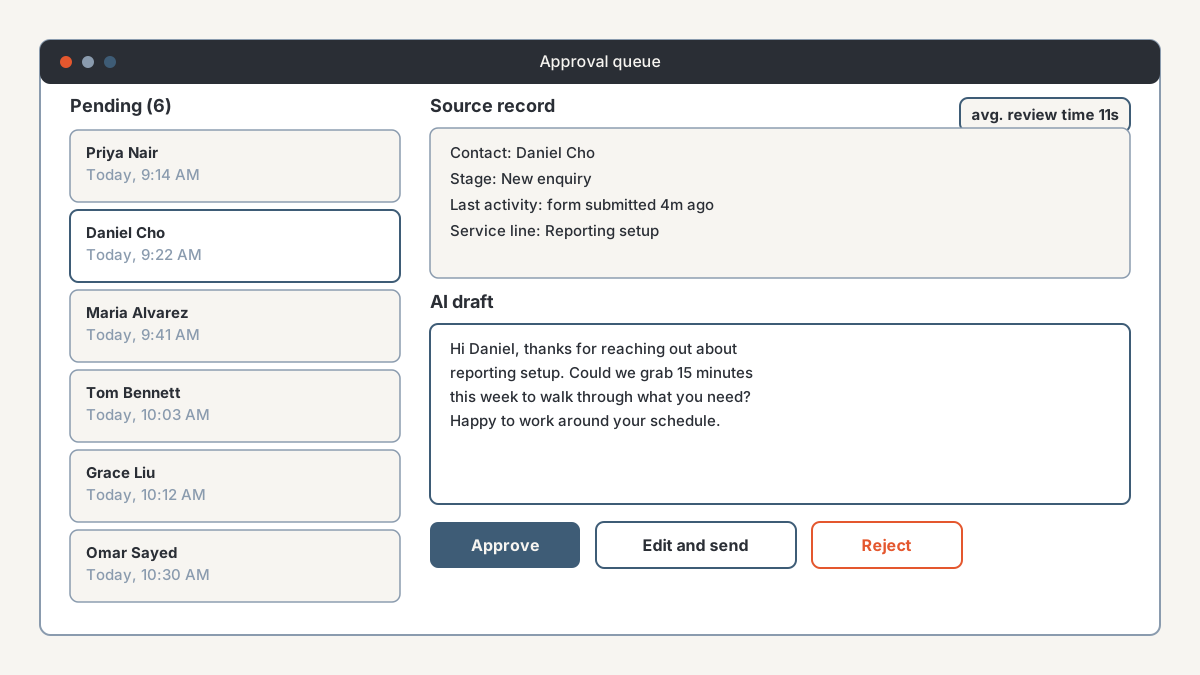
Approval fails by fatigue rather than by design. If clearing twenty drafts takes forty minutes, by week three they are being approved unread, and you have the appearance of oversight, which is worse than none because you will trust it. Aim for seconds per item. Batch the queue instead of trickling it in as notifications, put the source record beside the generated output so nobody opens a second tab, allow editing in place, make rejection one click, and store the decision.
Then measure the review, because the review is a system too. A rejection rate sitting at zero across hundreds of items means either the workflow is genuinely good or nobody is reading, and those look identical on a dashboard. Seeding a deliberately bad draft into the queue tells you which one you have.
What should you be logging, and why?
Enough to answer "why did it send that?" nine days later, in front of a client, without guessing.
For every AI step, store: a run identifier, the trigger and the record it fired on, the resolved input the model received, the model name and version, the raw output before processing, the validation result, the action that followed, who approved it if anyone did, timestamps, and the token count or cost.
Two of those get skipped, and both hurt later.
Log the resolved input rather than the prompt template. The template lives in your repository and hasn't changed. What you need is the fields substituted into it that day, because the record has been edited four times since. Without it you can see what the model said and never what it was told.
Log the model name and version. Output drifts when a provider updates a model, and if you can't tell which version produced which output, changed behaviour is indistinguishable from changed data.
Keep the log durable and queryable. Run histories inside automation platforms expire, and they are built for reading one run rather than asking how many drafts you rejected last month and for which client. Write to a database you control. One path for that is in exporting GoHighLevel data to Supabase, and the same argument applies to any CRM that overwrites state instead of appending it. Once the record has changed, the log is your only evidence of what the automation saw.
Then there is the second use, which nobody plans for. Every rejected draft, and every draft a human edited before sending, is a labelled example of what your prompt gets wrong. That gap between written and sent is the most specific improvement brief you will get.
One thing to settle before the table exists: these logs hold client and prospect personal data, message bodies included. Decide retention and access now rather than after somebody asks.
What happens when the model fails?
Define it in advance for every AI step. If you cannot say what the workflow does when a step returns nothing, that step is not ready to run against client data.
Four failure modes, roughly in order of how often they show up:
- Timeout or rate limit. No response at all.
- Malformed output. The right idea in the wrong shape, usually broken JSON or a value outside the set you expected.
- Plausible and wrong. Well formed, confidently phrased, factually incorrect. Validation catches nothing here, which is why expensive-to-be-wrong actions sit behind approval.
- Provider outage. Rare, and it will happen on a Monday.
The response pattern is the same each time. Validate before you use anything: shape, required fields, allowed values, a sensible length bound. Model output should never flow straight into an action. Retry with backoff, but cap the attempts, because an uncapped retry is where the cost problem starts. Then fall back to something deterministic, like round-robin assignment instead of an AI routing decision.
Where there is no safe default, do nothing and escalate. Flag the record, leave the field empty, put it in front of a person. An empty field somebody fills in beats a guess nobody can distinguish from a real value.
What you never want is silent failure. "Hi ," at the top of an email is the visible version. The invisible version is four hundred records skipped because a step returned nothing and the workflow read that as success.
So make fallbacks loud. Alert on the fallback rate rather than only on hard errors. A rate climbing from occasional to routine means something upstream changed while every run still reports as completed, and that is the one that hides longest.
How do you stop an AI workflow running up a bill?
Every call costs money, and the workflows that spend most are the ones nobody watches.
Two patterns produce the surprise invoice. There is the loop, where a workflow triggered by a record update contains an AI step that writes back to that record and triggers itself. And there is the accidental backfill, where somebody changes a filter and the nightly run reprocesses the whole contact database instead of yesterday's additions.
Four caps handle most of it.
Put a per-run limit on items processed and calls made. A run that hits the ceiling should stop and alert rather than quietly completing, because hitting it means your assumptions about volume were wrong.
Set a monthly budget with alerts below it, and keep your own counter alongside whatever the provider offers. Provider-side spend controls and their reporting lag vary, so treat them as a backstop rather than your primary limit.
Build a kill switch: one flag, checked at the top of every AI step, that stops all of them without anyone editing a live workflow under pressure. Everyone who might need it should know where it is, and it should have been tested once. An untested kill switch is decoration.
Add loop guards. No workflow whose AI step writes to the field that triggers it, plus a per-record counter so one contact cannot be processed twenty times in an hour.
Then track cost per useful outcome instead of cost per call. A workflow costing a few dollars a day whose drafts get rejected most of the time is not cheap, because review time belongs in its cost and that is the expensive input in an agency.
What does this look like in one workflow?
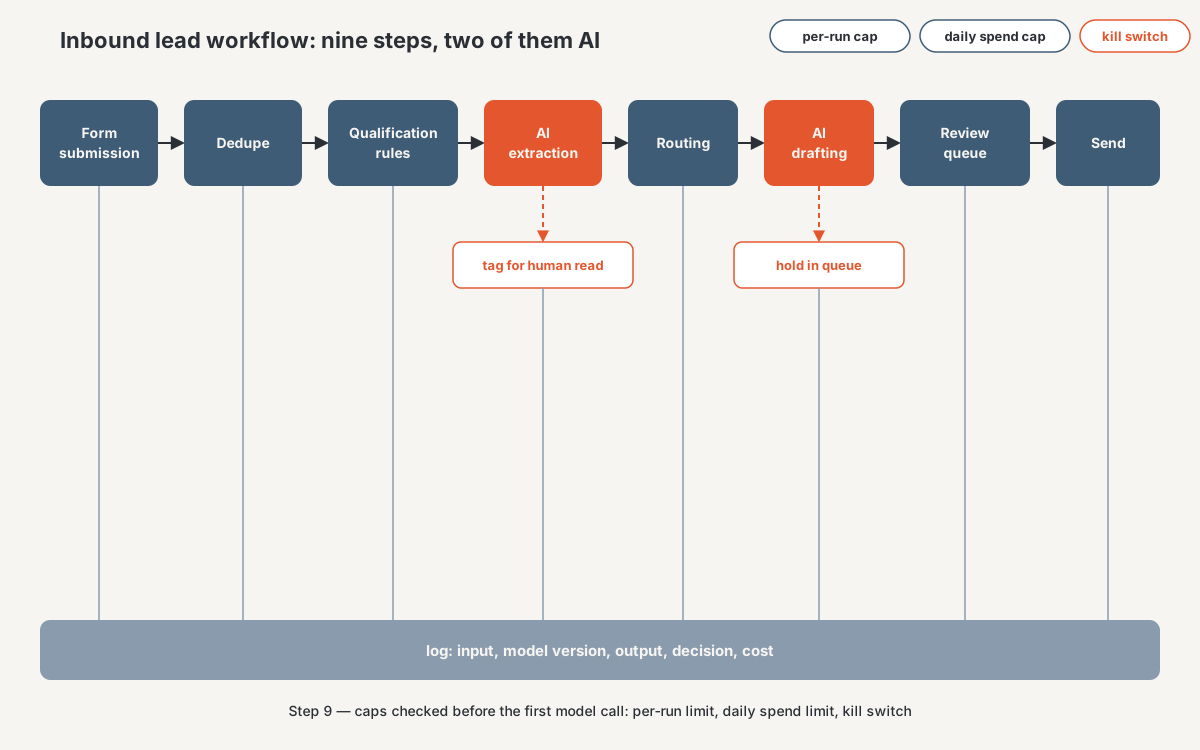
Here is an inbound lead routing and follow-up workflow with all four controls placed. Treat it as an illustration of the architecture I would build rather than a description of a delivered engagement.
- Trigger. A form submission reaches the orchestration layer, and a deterministic dedupe against normalized email and phone runs before anything else, so a match takes the existing-contact path.
- Qualification. Deterministic rules on territory, service line, and the budget field. No model, because a person can verify each of these and a client may one day ask them to.
- AI step one, extraction. The free-text "what do you need help with" box becomes structured fields, validated against an allowed value set, two retries maximum. On failure the fields stay empty and the record gets tagged for a human to read.
- Routing. Deterministic, off the structured fields. Empty fields go to round-robin assignment instead of stalling.
- AI step two, drafting. A first-reply draft gets generated. This step has no send capability, and its only output destination is the review queue.
- Approval. The owner sees the source record and the draft together, then approves, edits, or rejects. Rejections capture a reason, which is what makes the log worth reading.
- Send. Deterministic, on an approval event only. Suppression is checked at send time rather than draft time, because the list may have changed while the item sat in the queue.
- Logging. Every step writes to a queryable table: inputs, outputs, validation results, decisions, approver, cost.
- Caps. A per-run item limit, a daily spend limit, and the kill-switch flag checked before the first model call.
Two AI steps out of nine. That ratio is normal, and it is the point: the model steps hold the value, because interpreting free text and writing a first draft are hard to do with rules. The other seven let you run it on a Monday without watching. Which orchestration tool you build in matters less than whether it can express retries, guards, and a queue, though the options differ more than they look: Make vs Zapier vs n8n for agency operations.
Where should you start?
Logging first, before any AI step touches real records, because you cannot retro-fit evidence for last week. Caps second, since they take an afternoon and remove the one failure here that arrives as a bill. Then approvals, wider than feels necessary: review everything for the first two weeks whatever the tier, so you learn your real error rate before a client does. Fallbacks come last, and by then those two weeks will have shown you which ones you need.
Frequently asked questions
Should AI ever send an email to a client or prospect without a human approving it?
Not while you are still learning the error rate, and for first contact with a new prospect I would keep approval permanently. Being wrong there costs a relationship, and approving costs seconds if the queue is built properly. Internal output is a different question, and that is where unsupervised running belongs.
How is this different from "human in the loop"?
"Human in the loop" describes an intention, and it collapses when volume rises, because a slow loop turns into rubber-stamping and you keep the delay without the oversight. The four controls here are what make the intention hold: which actions queue, what gets recorded, what happens on failure, and what stops it.
Which automation tool should we build this in?
Any of the mainstream orchestration platforms can carry these controls, and the deciding factors are usually error handling, whether you can inspect and query run data, and how comfortable you are with self-hosting. That comparison is its own decision, which I have worked through in Make vs Zapier vs n8n for agency operations. The bigger cost is rarely the licence.
What does an AI workflow cost to run per month?
It depends on volume, model choice, and how much text goes through each call, so any figure quoted without those is guesswork. The costs that surprise people sit outside the per-call price: retries, reprocessing, and the review time attached to a workflow with a high rejection rate. Instrument it before you forecast it.
Do we need all four controls for an internal-only workflow?
Logging and cost caps, always. Both are cheap, and they are what let you debug or forecast anything. Approvals can start narrow while the output stays inside your team, and fallbacks scale with how much the next step depends on that output. The moment an internal workflow feeds a client-facing one, it inherits the client-facing rules.
Get an AI workflow and reporting diagnostic
If you are running AI steps against client data and cannot say where the approval gates are, what is being logged, what happens when a call fails, or what it cost last month, those are answerable questions with a finite scope.
That is what the agency CRM and reporting diagnostic covers on the automation side: a paid, bounded review of the workflows you already run, the data they read and write, and the controls around them, ending in a named list of the gaps and the order to close them. You keep the findings whether or not you do the work with me.
Start a diagnostic, see how I work with performance-marketing agencies, or read what a data solutions and integration build involves once the controls are agreed.
About the author. Ahmed Abdelkhalek is a Data Automation and Reporting Consultant and the founder of ChromiumData, a founder-led consultancy building reliable reporting and connected data workflows for performance-marketing agencies. He works with clients directly from diagnosis through delivery, usually on the parts that only show up after launch: workflows that skip records without saying so, automations nobody can explain to a client, and costs nobody was watching. He holds the AWS Certified Solutions Architect (Associate) and Microsoft PL-300 certifications. More at chromiumdata.com/author/ahmed-abdelkhalek.