Somebody on the team runs a subject line test. Variant B comes back ahead on opens, it goes into the house style guide, and three sends later nobody can find the lift again. When the client asks whether the testing has changed anything, the honest answer is that nobody knows.
That's the normal outcome at agency list sizes, and it isn't really a GoHighLevel fault. Running the test is the easy part. The platform then hands you two percentages and nothing to say whether the gap between them means anything, so most winners declared inside a CRM dashboard are coin flips that got promoted.
What can you actually A/B test in a GoHighLevel email?
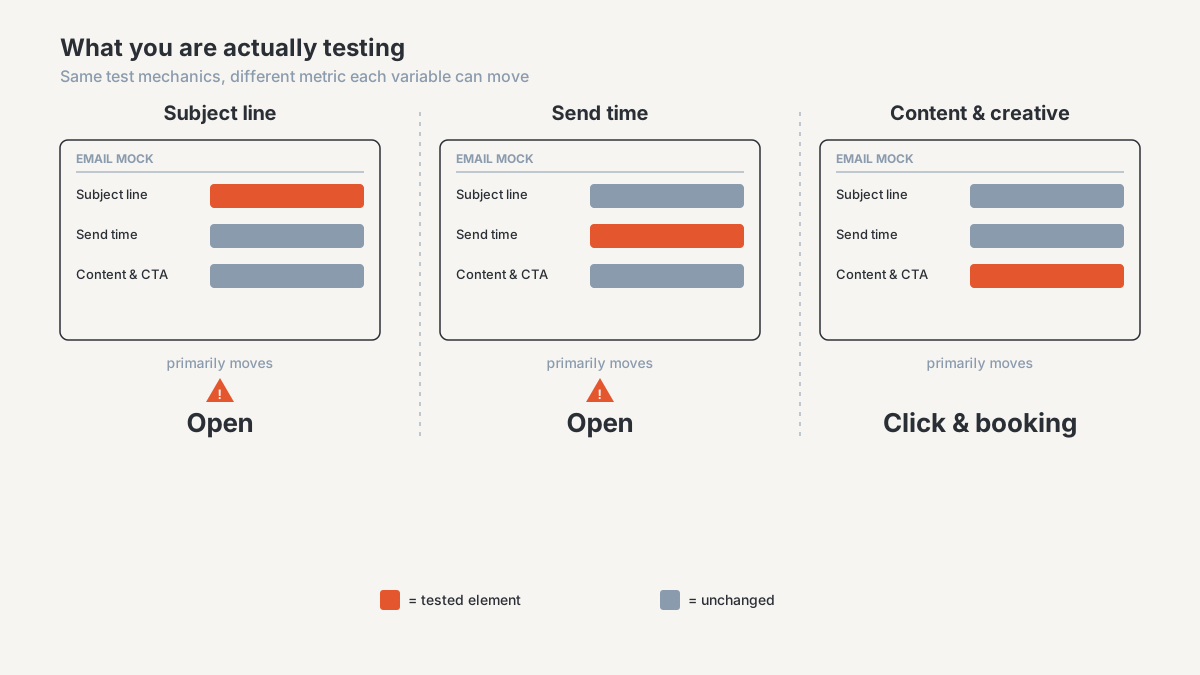
Three families of variable, in rough order of how often agencies test them and reverse order of how much they matter.
Subject lines and preview text
The most tested and the least useful, because the metric it moves is the one you can trust the least. Test it anyway when the variants are genuinely different: a question against a statement, a specific number against a vague benefit, a personalization token against none. Testing "Your report is ready" against "Your report's ready" wastes a send.
Preview text is the neglected half of the same test. It takes up as much room in most inbox previews as the subject line, and usually just inherits the first line of the email.
Send times and days
Worth testing, badly designed almost every time. A send-time test is the one you can't run concurrently, so any difference between Tuesday 9am and Thursday 4pm is confounded with everything else in those two windows. Repeat it across several weeks before believing it.
Timezones make this messier than it looks. The sub-account, the contact record, and the workflow evaluating the schedule can each carry their own, so "9am" is a range rather than a moment across a national list. The same setting distorts reporting generally, which I've covered in why your GoHighLevel numbers don't match GA4.
Content and creative
These are the tests that change outcomes rather than open rates. Plain text against a designed template. One call to action against three. Offer framing, which is a copy test in name only. A booking link straight to the calendar against a landing page in between.
Score them further down the funnel. A template change can lift clicks and lower booked calls at the same time, and only one of those numbers appears on the email report.
How does splitting the list work inside a GHL workflow?
Two patterns cover almost everything agencies build.
The first is a workflow split. Add a split action that distributes contacts across two or more paths by percentage, then hang a different email off each path. Contacts get allocated as they arrive, so both variants send in the same window to the same population. Use it for everything except a send-time test. Verify the current name, configuration options and allocation behaviour of the workflow split action in your own account before you rely on it, including whether allocation is random per contact.
The second is a bulk send to a filtered segment, which is what most people reach for. Build two smart lists on a field that has nothing to do with the message, then send version A to one and version B to the other at the same moment. Split on anything correlated with behaviour, like tag, source, or date created, and you've quietly turned a creative test into an audience test.
If your account has a native A/B option in the email builder, the mechanics are handled for you, and the winner logic underneath it deserves the same skepticism as everything else here. Confirm whether your current GoHighLevel email campaign builder offers a native A/B split with automatic winner selection, and if so what metric or threshold it uses.
One step matters more than the split mechanism, and almost nobody does it. Tag every contact with the variant they received. Not for the email report, which already knows, but for everything downstream: the appointment, the opportunity, the closed deal. Without that tag your test can only ever be scored on opens and clicks, the two numbers that matter least. If you're already wiring capture for that downstream data, it's the same build as a stage-change history table, and the same mechanism as an outbound webhook feeding it.
Why is it so hard to call a winner in GoHighLevel?
Four reasons, and they compound.
Open rate stopped being a measurement
Apple Mail Privacy Protection preloads tracking pixels for users who turned it on, whether or not anyone opened the message. Those contacts register as opens on send, at close to a hundred percent, on a timestamp that reflects Apple's fetch rather than a human. Corporate security scanners run their own version of this.
The effect on a subject line test is specific. Your open rate is now a blend of real opens and automated ones, and the automated share doesn't respond to your copy at all. It sits on the signal as a fixed block of noise, so a genuine lift reaches your dashboard looking smaller than it was, and small gaps are the ones that fail scrutiny. Send-time tests scored on opens are worse off, because for that population the open timestamp is fiction.
Nothing tells you whether the difference is real
GoHighLevel's email stats give you delivered, opened, clicked, replied, bounced and unsubscribed per send. What they don't give you is a confidence interval, a p-value, or any hint of how many contacts you'd need before two percentages could be told apart. Check whether that's changed in your own account before assuming it hasn't.
That absence is normal for a CRM. It's also why a four point gap that is pure sampling noise looks identical on screen to a real effect. People call the bigger number the winner because nothing suggests they shouldn't.
Your list is probably too small for the difference you're testing
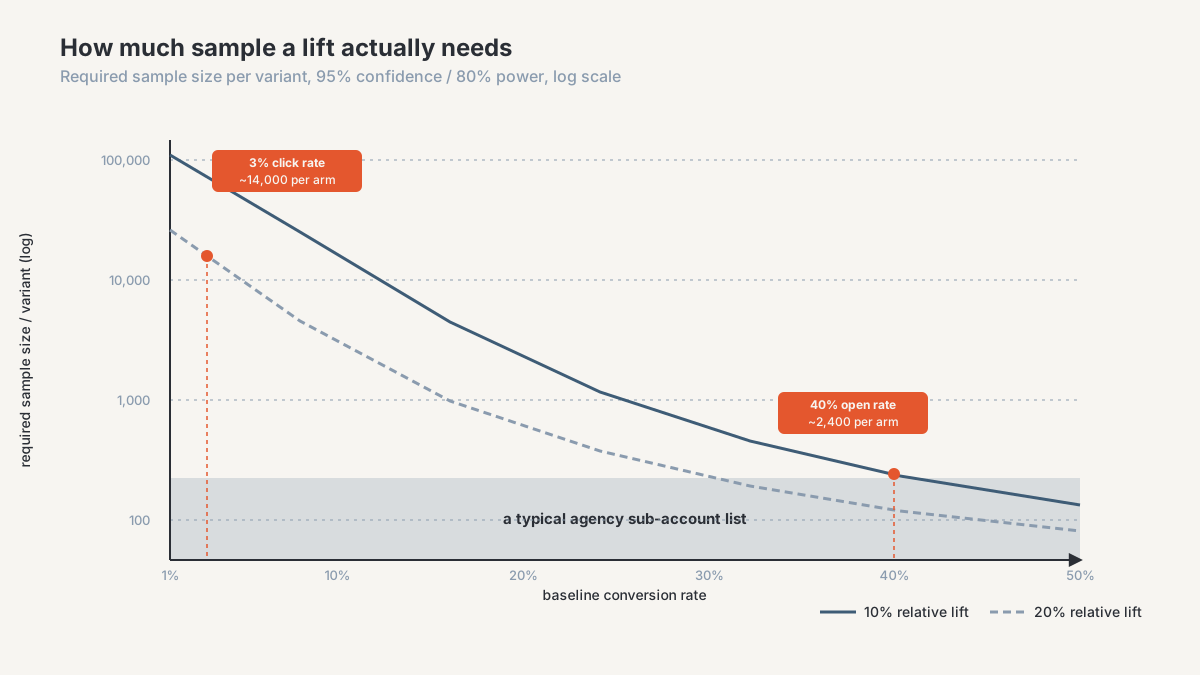
This is the one that ends most testing programs, and it's arithmetic rather than opinion.
Take a two-proportion test at 95% confidence and 80% power, the usual bar. If your true open rate is around 40% and you want to reliably detect a lift to 44%, you need roughly 2,400 contacts per variant. Not 2,400 on the list. 2,400 delivered per arm.
Click rates are harder, because the baseline is smaller. At a 3% click rate, detecting a lift to 3.6% takes near 14,000 per arm. Booked appointments, the number your client actually cares about, sit an order of magnitude below that.
Most agency sub-account lists don't hold those numbers, and the engaged portion certainly doesn't. Testing isn't pointless at that size. It means small differences are undetectable, so the only tests worth your time are big swings.
Sequential sends aren't a split test
A design fault rather than a platform fault, and I see it constantly. Variant A goes out this week, variant B next week, and the two get compared as though copy were the only difference between them.
Everything else moved too. Different day, different point in the month, a list mailed once more, different people in the segment because it kept growing. When the workflow only supports one active variant at a time, or whoever runs it finds a split fiddly, this is the shape the test collapses into. Whatever it measured, it wasn't the subject line.
How much sample do you need before trusting a result?
Work backwards from the smallest lift worth acting on and check whether you have the volume to detect it. If not, the test isn't ready.
Set the sample size before sending and stop at it. Calling a running test the moment one variant pulls ahead is the most reliable way to manufacture a false winner, since with two random series one is always ahead at some point.
Nominate one primary metric before sending and score against that. A variant that lost on clicks didn't win because its unsubscribe rate looked nicer.
Score on the deepest metric your volume supports. Clicks over opens, since a click is a deliberate act and a preloaded pixel isn't. Replies and bookings over clicks when the list is large enough, which it usually isn't.
Accept the calendar hit. A test needing 5,000 delivered per arm, on a list that mails 1,200 a week, is a four week test rather than a failed one. Testing programs die because people expect a result per send.
How do you compute significance outside GoHighLevel?
You export, and you calculate somewhere else. It isn't sophisticated work.
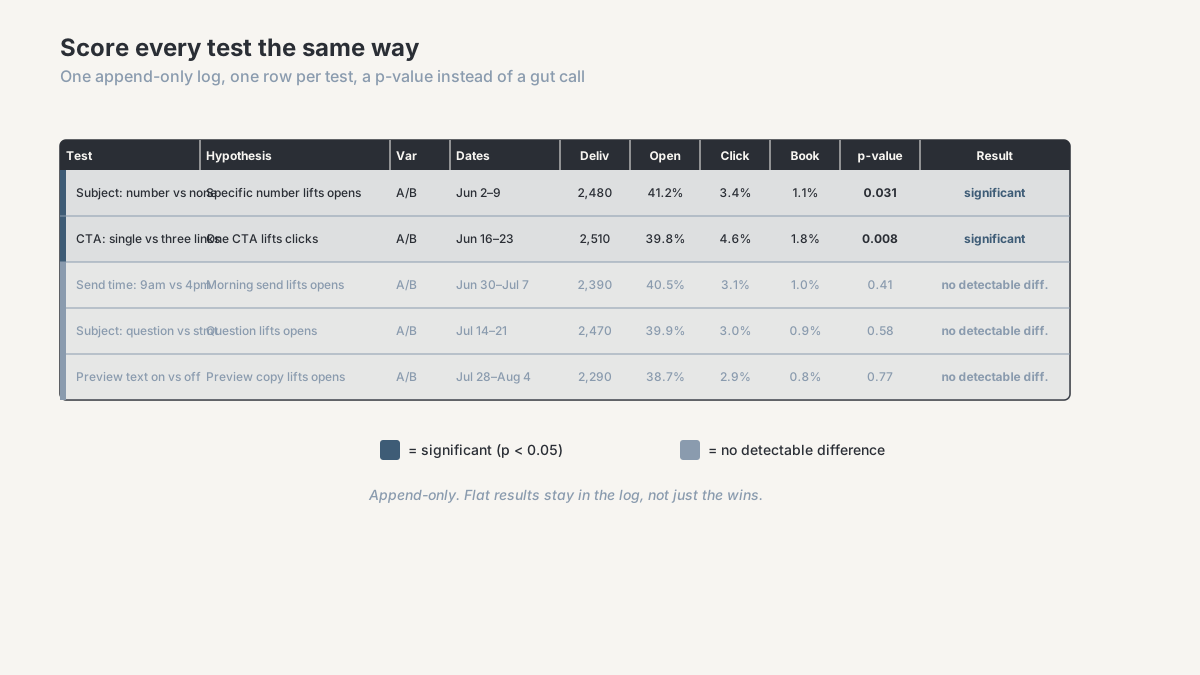
Per variant you need four numbers: delivered, opened, clicked, and whatever downstream count you tagged for. Take them out of the email report into a sheet with one row per variant per send, alongside the test name, the date range, and the hypothesis.
Then run a two-proportion z-test on the primary metric. Any statistics calculator does it, a sheet formula does it in one line, and the output is one number: the probability of a gap this large if the two variants were identical. Below 0.05 by convention, you have something. Above it you have a coin flip, and writing that down is the point of the exercise.
Keep the log append-only, flat results included, in one sheet nobody overwrites. The value compounds. After twenty tests you can see which categories of change ever move anything for this audience, which beats any individual result. GoHighLevel won't hold that history for you, since it stores current state and overwrites rather than appends, the weakness I've described in what GoHighLevel overwrites in your pipeline history.
Automate the export before you start enjoying the sheet. A scheduled pull is the pattern I build most often for agencies, and it looks like the GHL to Google Sheets workflow in my portfolio. Once results have to join opportunity and revenue data, that belongs in a database rather than a tab, which is the path in exporting GoHighLevel data to Supabase.
Write down what counts as a conversion while you're there. Two people scoring the same test against different definitions is its own failure mode, and the fix is a written KPI dictionary rather than a better dashboard.
Do you need a holdout group?
For a single test, no. For a program, yes, and it answers a different question.
A holdout is a randomly selected slice of the audience that receives nothing at all. You keep it out for a defined period, then compare bookings, opportunities and revenue against the mailed population. It's the only measurement that tells you whether the email program produces incremental results or harvests people who would have come back anyway. Reactivation campaigns against old lists are where that gets uncomfortable.
Keep it small, five or ten percent, because a holdout is deliberate lost revenue when the program works. Tag it on the contact record at the moment of selection, or you'll have no way to identify the group later.
When is a GHL A/B test not worth running?
Three situations where I'd tell an agency to skip it.
When the list can't detect the effect. If your engaged segment is a few hundred contacts, no subject line test will reach significance, and running it produces confident nonsense. Test structural changes instead: a different offer, a different format, a sequence rather than one send.
When nobody will act on the result. A test that wins and changes no template, no send time and no SOP was a way of feeling rigorous. Decide the action before you send.
When email isn't the constraint. If leads arrive with broken attribution, contacts are duplicated across records, or pipeline stages mean different things to different people, optimizing a subject line is rearranging furniture. The reporting layer has to be trustworthy before any test on top of it means anything, and native GoHighLevel reporting has boundaries I've mapped in when GoHighLevel's native reporting isn't enough.
For a lot of agency lists, the best available approach is a few large structural tests a year, scored on bookings, logged honestly, with a standing holdout. It looks thinner than a testing calendar. It also produces answers you can defend when a client asks.
Frequently asked questions
Does GoHighLevel have built-in A/B testing for emails?
You can split a list inside a workflow and send a different email down each path, which is a working A/B test. What the platform doesn't provide is the statistical half: no sample size guidance, no significance calculation, no confidence interval. It shows two percentages and leaves the interpretation to you. Check your own account for a native split option in the campaign builder, since that changes.
Why do my GoHighLevel open rates look inflated?
Apple Mail Privacy Protection preloads the tracking pixel for users who enabled it, recording an open whether or not anyone read the message, and corporate security scanners do something similar. Your open rate is a mix of human and automated opens, so treat it as directional and score subject line tests on clicks where volume allows.
How big does my list need to be to A/B test an email?
It depends on the metric and the lift you want to catch, not the list alone. Detecting a four point move on a 40% open rate needs roughly 2,400 contacts per variant at 95% confidence and 80% power. A similar relative lift on a 3% click rate takes several times that. Work the number out before sending rather than after.
How do I know if my email A/B test result is statistically significant?
Export delivered and converted counts per variant, then run a two-proportion z-test in a sheet or an online calculator. If the probability of the gap arising by chance is above 5%, you don't have a winner, you have two similar emails. Fix the sample size before you send, and don't stop early because one side is ahead.
Should I test subject lines or send times first?
Neither, on most agency lists. Both get scored on open rate, which Apple's preloading has made the least reliable number you have, and both usually move it too little to detect at the volumes involved. Start with content and offer tests scored on clicks or bookings, because those produce effects large enough to measure.
Get your email testing measured properly
If you're running email tests in GoHighLevel and can't say whether any of them changed anything, that's a measurement problem with a finite answer.
I run an agency CRM and reporting diagnostic: a paid, bounded review of your GoHighLevel setup, what your reporting can and can't prove, and where the numbers you send clients diverge from what happened. For email that covers whether your list sizes support the tests you run, how variant data gets onto the contact record so results survive the send report, and what the scoring layer needs to look like. You get the findings and a prioritized fix list whether or not you build it with me.
Book a diagnostic, or see how I work with performance-marketing agencies on CRM and reporting data.
About the author. Ahmed Abdelkhalek is a Data Automation and Reporting Consultant and the founder of ChromiumData, a founder-led consultancy building reliable reporting and connected data workflows for performance-marketing agencies. He works with clients directly from diagnosis through delivery, mostly at the unglamorous end: CRM data that won't reconcile, reports assembled by hand every month, results nobody can reproduce a quarter later. More at Ahmed Abdelkhalek.